
Cyberlife Development LLC provides end-to-end services for small businesses to successfully implement their Instagram marketing services through planning, setup, integrations, deployment, monitoring, and useful documentation as part of the handoff.
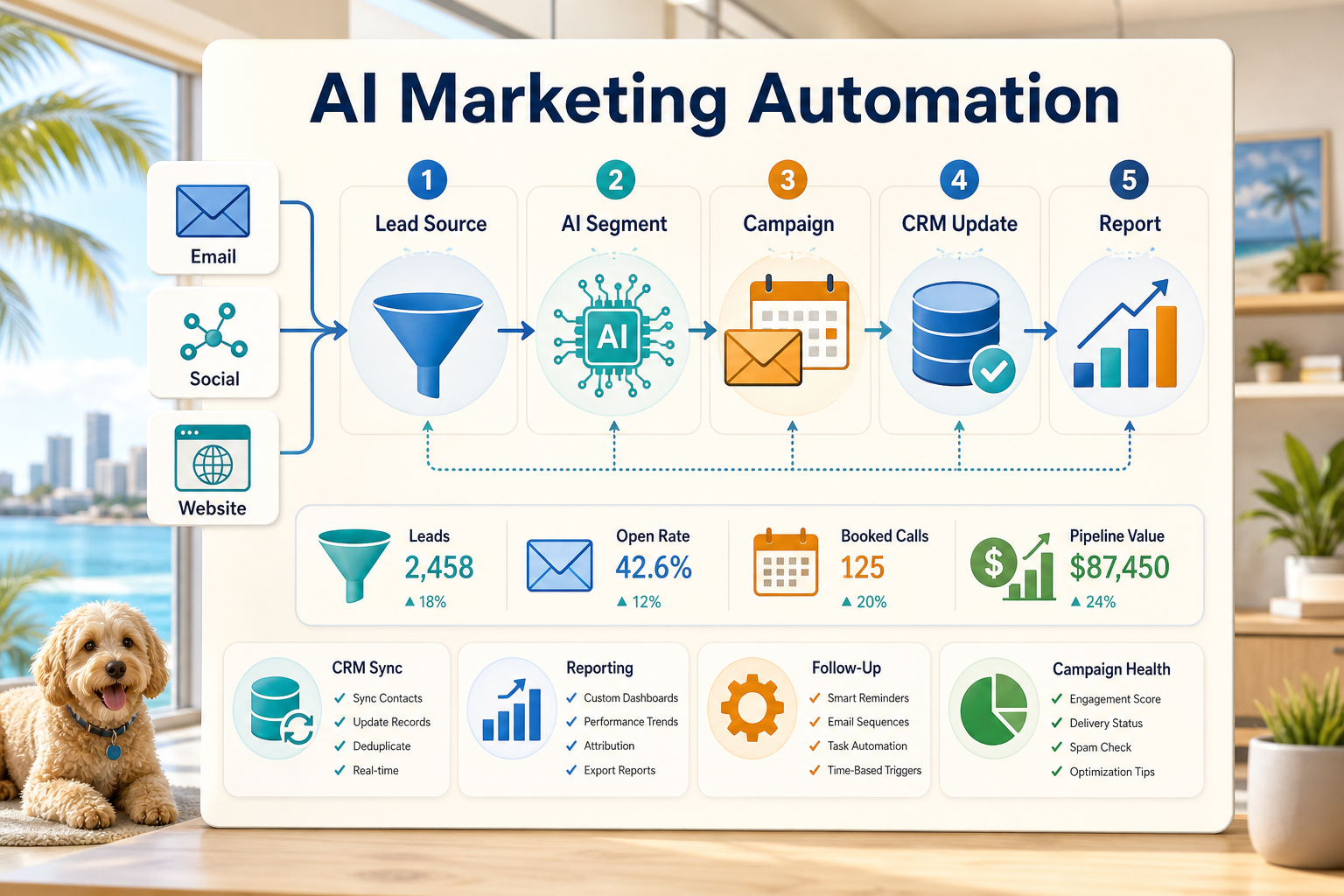
Cyberlife Development LLC's Approach to the Work
We start by looking at the request workflow and integrate pieces like the target data, the need to automate, who addresses the exceptions, and what information is to be reported. We then set up the necessary tools, integrate the APIs, prepare the VPS/cloud as necessary, and do a handoff so the system can be managed.
Typical implementation
Capturing the workflow and determining the technical needs.
Designing automation of forms, tasks, CRM records, spreadsheets, reports, bots, APIs, dashboards, and more.
Setting up a VPS, configuring a server, and installing the required software along with setting up Docker, Nginx, SSL, and backups, and monitoring as needed.
Setting up a system for the team which includes testing, setting up alerts, handling errors, and providing a simple set of operational instructions.
When to Use This Service
Come here for a solid technical setup due to the business impacts of fewer manual updates, quicker reporting, safer handoffs, or hosted automation that continues to run post-launch.
Check the closest existing service page (/marketing-social-media-automation/) or reach out to Cyberlife Development LLC for a request with the workflow you’d like us to automate.
What This Page Is About
Most teams don’t want another platform. Most teams would want a certain part of the week to be less fragile. Copy lead info from email to CRM. Export the same numbers every Friday. Check to see if a certain document made it to the right folder. Small tasks like these are easy to ignore until they start dictating the pace at which a company can respond.
This is what ai marketing automation actually addresses. The right question in this context is not, does automation make it look or feel modern? The right question is, where in the process of the current system does a break occur, who is responsible for the post clean-up, and what is the post clean-up process if the time consuming tasks are automated and the same steps are executed in a predictable manner?
For smaller businesses, the initial version should generally not be wide. Choose one (1) workflow, determine the trigger, determine which data can be trusted, specify the points where the results must be evaluated, then build the first version before the other workflows are built.
Where the Work Typically Begins
A simple first step is a workflow diagram. The diagram does not have to be structured. It needs to help you answer some of the uncomfortable questions: what figure's first, what pieces of data are involved, what system owns the data, who is the stakeholder, what does complete mean, and what should happen in the event of an anomaly.
This is where the workflow either becomes useful or becomes noise. If the workflow is not clear, then the automation will be not clear. If the team is not clear on the handoffs, then the tools will only automate the confusion.
The better approach is to build slower first and build faster later. Document what is being done. Remove steps that are only there due to the limitations of a previous tool. Keep the steps where discretion is required. Automate the steps that are repetitive and easy to verify.
Common workflows connected to this topic
The specific configurations differ based on each individual company, but there are commonalities. Web forms can perform multiple steps: create a new CRM record, assign an owner, send an initial response, and create a follow-up task. A support request can be categorized, matched with the related account, and drafted with the help of a review prompt. It can then be routed to the appropriate reviewer. A weekly report can be generated to extract data from multiple systems and send an automated report that summarizes the content prior to the scheduled Monday meeting.
Starting from document workflows is also very common. Invoices, intake forms, PDFs, contracts, and spreadsheet rows frequently contain structured data in unorganized and unclear forms. Automation can be used to extract data from forms and rename and update records, as well as create cases to be reviewed.
Research workflows also fit within this context. There is no need for someone to create a collection of drafts from multiple notes that are dispersed in different locations, such as in various websites, spreadsheets, an email inbox, and chat threads. A workflow can be designed to collect and format the required inputs, leading to a draft that can be used upon review.
What should stay human
The most secure automation projects are the ones that acknowledge which parts of the workflow should remain manual, instead of automated. Things that require a human review and are difficult to automate include the pricing of a product, providing customer support, drafting legal or medical documents, and reviewing and responding to vague or unclear complaints. When certain aspects of automation are implemented, the automation is not a failure; it is a step in the right direction.
With an automation system to capture, format, and suggest the next step, the user still has the ability of approve the next step. Besides the obvious time savings, the system also avoids a common failure of automation systems, which is to make a business decision that the owners cannot explain.
For Cyberlife projects, the optimal design principle appears to be “automate the prep, keep the approval.” The system is capable of gathering context, drafting messages, updating records, and providing the exception. It is up to the person to decide if the exception warrants exercising judgment.
Tool Choices Without Tool Worship
Some tools are necessary, but they shouldn’t dictate the primary focus of the workflow. Some projects may just require simple connectors, while others may require an n8n, Make, Zap, Google Workspace, CRM, private database, or even a custom API. Some projects may benefit from OpenAI, Claude, Gemini, or other tools to provide classification, extraction, summarization, or drafting. Others may require decent infrastructure support, such as a VPS, Docker, etc, to have a lot of support and reliability built into the workflow.
The incorrect tool choice usually occurs when the project is started without a clear business problem, but instead is begun with a platform demo. A tool can look really impressive, but it may be completely inappropriate for the workflow design. A boring design that everybody on the team can understand is often better than a really complex design that nobody on the team wants to use.
When it comes to evaluating ai marketing automation, a better checklist is as follows: can the workflow be tested, can errors be displayed, can a non-technical business owner understand the hand-off, and can the business change the workflow design without having to start over from the beginning.
What Should be Done Before Beginning Construction?
Before the process is fully automated, collect actual examples. Do not use perfectly simple examples. Use the semi-complete spreadsheet row, the partially complete. use the email with missing information, the invoice with add vendor name, or the support ticket that causes back and forth correspondence.
Then specify what you want as an end result. Outputs may include an updated CRM, a new dashboard, a new task, an alert, a new file name, a new draft reply, a report, or a human review queue. The output must be clear enough that team members know whether it has been achieved.
It is important to include exception rules. These can include the conditions that cause the workflow to stop, information that must be routed to a specific person, information that is sensitive, information that must be reported, and information that must not be sent by an automated process.
Assessing Effectiveness
The best measures are the simplest. Has the lead received a reply, and has it been an improvement? Has the report been sent without needing to be formatted? Have fewer support requests been sent to the incorrect inbox? Has the owner been able to see what was different, without the need to open five different tools? Have team members spent less time copying information and more time making decisions?
Not all supportive processes need a comprehensive cost-benefit analysis. For a small business, the time and cost savings are sufficient to justify starting the first automation project. The most important part is to assess the effectiveness of the process that is being automated, even if the process is not documented in detail.
The first automation effort should simplify a process that is done on a daily or weekly basis. If the process shows no sign of improvement, then the automation effort was probably too unclear.
The practical work should stay clear: map the process, connect the tools, handle exceptions, and leave the business with a workflow that can be checked and maintained.
What The First Version Should Include
An ideal first version contains a specific trigger, visible outcome, and a clear method for failure detection. The workflow contained in the first version needs to explain what the employees do and what actions they take for the unique case exceptions. If the exceptions are really meant to be handled at a later time or if a report is generated with multiple data sources, the report sender should be the faulting data source and not a summary that is too neat and too incorrect.
An example will not suffice for a prompt. AI has the ability to draft the workflow and perform the functions of a classifier and summarizer, yet the workflow should remain flexible and testable. Inputs should be illustrated. Outputs should be verified. The system should not guess what to do; rather, it should prompt for assistance.
Your first release should prevent too much branching, as too many early custom workflows integrate far too many edge cases. This mature system is essentially a fragile system. You want to focus initially on implementing the common path and workflow. This can be a good automation focus. The rest can be human reviewed and then automated along the common path after the business sorts out its edge case exceptions.
What can go wrong
Automation isn’t always as exciting as it may sound. Boring things happen frequently, like a spreadsheet with a renamed tab, a missing CRM owner, or a field name change. These things can be annoying, but it's not a reason against automation. These are things to consider when integrating automation with oversight mechanisms.
When integrating automation, it’s a good idea to build fallback behaviors to oversight mechanisms. Workflows should notify people in a context to fill the gap of the missing data, and Draft potentially sensitive customer-facing messages should be sent for approvals.
The demonstration of the business system is the difference between a working system and a business demo. The demo only visualizes the happy path, but with a working system you never know what the new week may bring.
When to ask for help
You can integrate simple internal automation systems when processes and tools are easy to integrate and someone can maintain the system, but for complex systems that integrate multiple workflows, use private data, require AI to be integrated, or impact business flows like selling, customer support, or business finance, you should seek help.
Cyberlife Development can document the workflow, create the initial version, and hand off a sustainable process to the team. The most useful starting point is not a lengthy technical document, but rather a concise description of which workflow is currently wasting time and what the desired workflow is.
Marketing systems that often pair well
Marketing automation is strongest when campaigns connect to lead capture, reporting, chat handoff, and the underlying workflow.