
Cyberlife Development LLC assists small businesses in implementing server management services. Offerings span planning, setting up, integrating, deploying, monitoring, and practical closure documentation.
What is Covered Here
What Can You Expect from Cyberlife Development LLC?
We begin with the task that initiates the flow, the source and target of the data, the actions that require automation, who is responsible for the exceptions, and what is to be reported. We then set up the necessary tools, link APIs, provide VPS or Cloud infrastructure, and create a system support guide to ensure the system can be supported and maintained.
What does Typical Engagement Look Like?
Capture flow and determine the underlying infrastructure and components.
Create automation elements — symptoms of a flow like filled out forms, documents, records in a CRM, prepared spreadsheets, generated reports, bots, APIs, funnels, and dashboards.
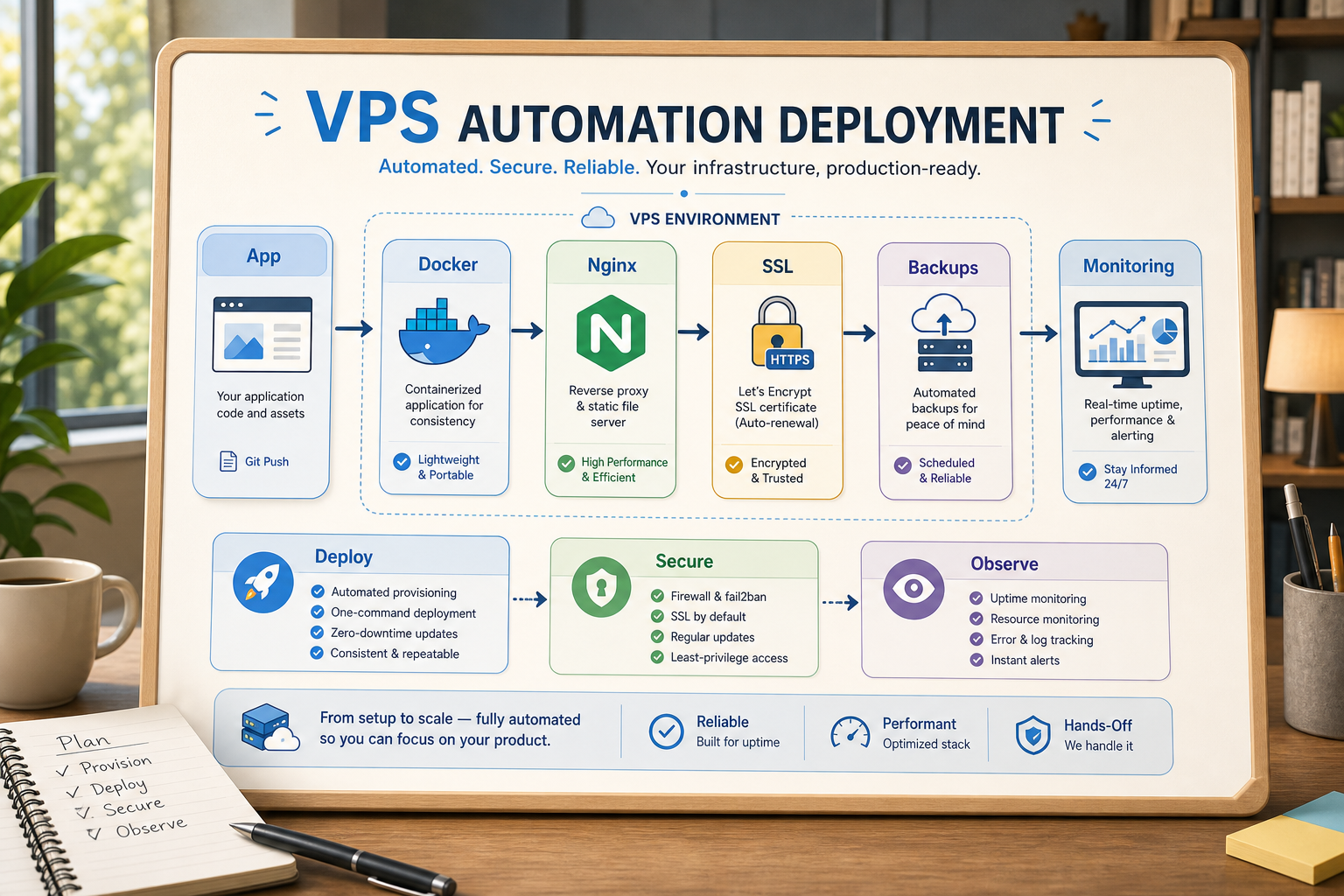
Provision and prepare stands for VPS, Configure Docker infrastructure with Nginx and implement SSL certificates and backups, Monitoring with prep software and supports for the engagement.
Create and prepare the infrastructure post engagement with notification and feedback mechanisms, capture user stories, and provide guides to the internal teams to get them operational as soon as possible.
When to use this service
You may want to use this page if you’re after a more reliable techno-business setup that requires fewer manual updates and provides faster reporting and safer handoffs. You may also wish to use this page if you want a hosted automation that is self- sustaining post-launch.
For the most comparable service, look at the page nearest to this one (/ai-automation/) or else reach out to Cyberlife Development LLC with the suggested workflow for automation.
What this page is really about
The most important factor in developing automation for a business is the context in which existing troublesome manual, repetitive, and unreliable processes are solved. Things like having a member of staff manually copy and paste lead details from an email to a CRM. Check if a document has been saved to the correct folder. Export the same numbers to a report every Friday.
These processes are small, and are often ignored, but, in the end, they can lead to significant impacts to the business in terms of how quickly the business can grow in response to customer demand.
In the context of automation, instead of asking how automation can be a useful addition, a better question to ask is what are the friction points in existing processes, how do those processes have to be improved in order to automate the process, and what do those friction points and existing processes look like once those processes have been automated.
The first iteration of an automation process is preferable to be as focused and narrow as possible, especially for a small business. To do this, pick a single workflow, identify an event that can be considered the trigger for the workflow, what data is considered safe and can be used for the workflow, what is the final review process of the automation, and lastly, what is the minimum viable automation that can be created.
Where the work typically starts
A good starting point is a simple workflow diagram. This doesn't have to be a perfect diagram. It has to answer some uncomfortable questions: what starts the process, what arrives, which tool is the record owner, who is notified, what determines it is done, and what should be done when something is out of place.
Where many automation projects either deliver value or noise is here. If the workflow is vague, the automation will also be vague. If the team cannot agree on the handoff, the software will facilitate the confusion at an accelerated rate.
Progress is best achieved with the approach of slower at the beginning and faster at the end. Document the current state and remove steps if they were added by tools used in the process. Keep human approval if there is a judgment call. Automate if it is repeatable, boring, and easy to check.
Standard workflows associated with this
Automation looks pretty similar most of the time, even if the end result varies by business. A form on a website can create a record in the CRM, assign a record owner, do the first reply and create the follow-up task. A support request can be routed to the correct person, streamlined, and prepared for a review with the account information. A weekly report can aggregate the necessary data to come up with a summary and be submitted prior to the Monday meeting.
Document workflows are a common starting point for automation projects. Invoices, intake forms, PDFs, contracts, and even rows in a spreadsheet contain structured data, but are formatted in complicated or confusing ways. Automation can pull necessary fields, rename documents, change data, and flag fields where it’s uncertain for a decision.
This automation is also true for research workflows. Instead of someone going around and collecting the research notes that are in a bunch of different places (websites, spreadsheets, inbox, chats), a workflow can collect notes, organize them, and produce the first research draft to be reviewed.
What should stay human
The most effective and safest automation projects acknowledge what areas of work will always be kept human. Judgements around pricing, how to respond to an upset and vulnerable customer, decisions that require professional expertise in the domains of law or medicine, unusual complaints, and documents that are verbose and unclear most likely require a human to step in and provide input. This does not weaken the automation, but instead, makes people more productive.
Great workflows can help people prepare what they need to make a decision, suggest how to proceed, and even ask for approval. This also avoids a common mistake of allowing a system to make decisions on behalf of the business that cannot be explained later.
For many Cyberlife clients, the correct approach is “automate the prep, keep the approval.” The system can provide context, draft a message, and update the system with a decision. It is then up to the individual to make a judgement call on whether or not the system should be automated.
Tool Choices without Tool Worship
The right tool choice plays an important role in a project, but it should come after the workflow. Some situations can be handled with simple connectors, while others require n8n, Make, Zapier, Google Workspace, a CRM integration, a private database, or a small custom API. Similarly, some projects require the use of OpenAI, Claude, Gemini, or a model for classification, extraction, summarization, or drafting. Other projects require the use of a VPS, Docker, along with backup solutions, monitoring, and logging because the workflow needs to run reliably and someone needs to supervise it.
The wrong tool choice tends to occur because the project starts with a platform demo and not with a business problem. A tool can look great and still be unsuitable for the workflow. A simple solution that the team can understand is often better than a complex solution that no one is willing to work with.
When it comes to vps automation deployment, the better checklist is quite simple: can the workflow be tested, are errors visible, can the handoff be understood by a non-technical owner, and can the business make changes to the rules later without having to start from scratch?
What to Prepare Before Building
One of the very first things to do is to prepare and gather as many examples as you can. Before going on and implementing your solution, using example data that is as imperfect is ideal. This can be demonstrated by presenting a messy email, a partially filled out form, an imperfectly organized row in a spreadsheet, an invoice with an unnamed vendor, and a customer service support ticket that creates a feedback loop between the customer and service team.
Then describe the expected outcome. It can include a CRM update, a dashboard, a task, a notification, a renamed file, a reply draft, a report, or a queue for human review. The outcome is precise when the team can assess whether the described condition has been met.
It is also useful to describe exception rules in advance. What should stop the workflow? What should be routed to a person? What data is private? What should be logged? What should never be sent without human involvement?
How to assess whether it has worked
The best metrics are, in fact, ordinary. Did the lead get a faster response? Was the report sent without the need to be modified? Did the support requests sit in the wrong inbox? Did the owner know what was different without opening five tools? Did the team spend less time on repetitive tasks to the point that they could focus on the most important decisions instead?
Not every automation needs a sophisticated ROI model. For a small business, the first project is often justified in the time saved and the mistakes avoided. The most important metric is to assess the old workflow, even if the assessment is rough, and then replace it.
A good first project to automate is one that simplifies a task that needs to be done at least once a day or once a week. If no one has any way to know that the task has been simplified, then the project has been too high level.
This topic can be phrased in several ways including vps automation deployment, server maintenance services, Ubuntu server setup, server setup, Linux server setup. Though the search language changes, the content must still be directed to the business owner rather than a keyword planner.
The page should make the practical work clear: mapping the process, connecting the tools, handling exceptions, and leaving the business with a workflow that can be checked and maintained.
What the First Version Should Include
What should the first version look like? There should be a clear trigger, an obvious result, and a way to see the failure. If the workflow is trigger by a submitted form, the team should know where the record will be, who will own the record, what will the notification be, and what will be done for the exception. If the workflow is trigger by a report from a few data sources, the owner should know which data source failed and not receive a summary of the failed report.
This is important when AI is used to do the summarization and data extraction. The workflow should stay testable. For each input, there needs to be an example, for each output, a review, and for each event, a log. If the model is uncertain, the system should ask for help.
The first release should minimize the number of branches as much as possible. Many developers feel the need to automate every edge case once a system goes live, but this results in a brittle system. Automation should seek to address the happy path, create a human review queue, and then build out the system based on the true edge cases once the business has visibility on them.
Risks of Automation
Many of the risks of automation stem from a lack of effort to monitor and maintain the various system interfaces. The name of a field could change, a user could be removed from the CRM, a spreadsheet could appear with a new tab, unexpected invoice formats could be sent by a vendor, an AI model may create an answer that is inconsistent with previous information, and so on. None of these are reasons not to automate. These are reasons to automate with the necessary checks and balances.
The best automation systems are designed to stop a process rather than make an assumption. They provide plenty of context to the user on why the system has stopped, allowing the user to make the business decision on what to do next.
Time to Bring in Others
When building out internal automations, it is best to keep to single point solutions. Simple internal automations can be built by any team member when processes and integrations are simple. Support should be sought for more complex, high-impact systems. These systems typically touch more than one internal/external proprietary system and data. They also often require AI, and support should be sought for any internal processes that are customer-facing.
At Cyberlife Development, we are able to chart your workflow, create an MVP, and provide your team with a sustainable practice to build upon. The best place to start is not with a lengthy technical scheme. It should be a concise description of the currently available workflow that is most inefficient and the established workflow that should be adopted.
Questions:
What is the distinction between an MVP and a sustainable practice in your opinion? How would you balance the need to adopt sustainable practices and the need to document lengthy technical schemes?
Deployment and maintenance paths
Deployment decisions affect uptime, monitoring, automation reliability, and reporting pipelines.