
Cyberlife Development LLC specializes in helping small businesses build and implement fully functional conversational AI chatbots, including the necessary planning, setup, integrations, deployment, and monitoring, along with handoff documentation.
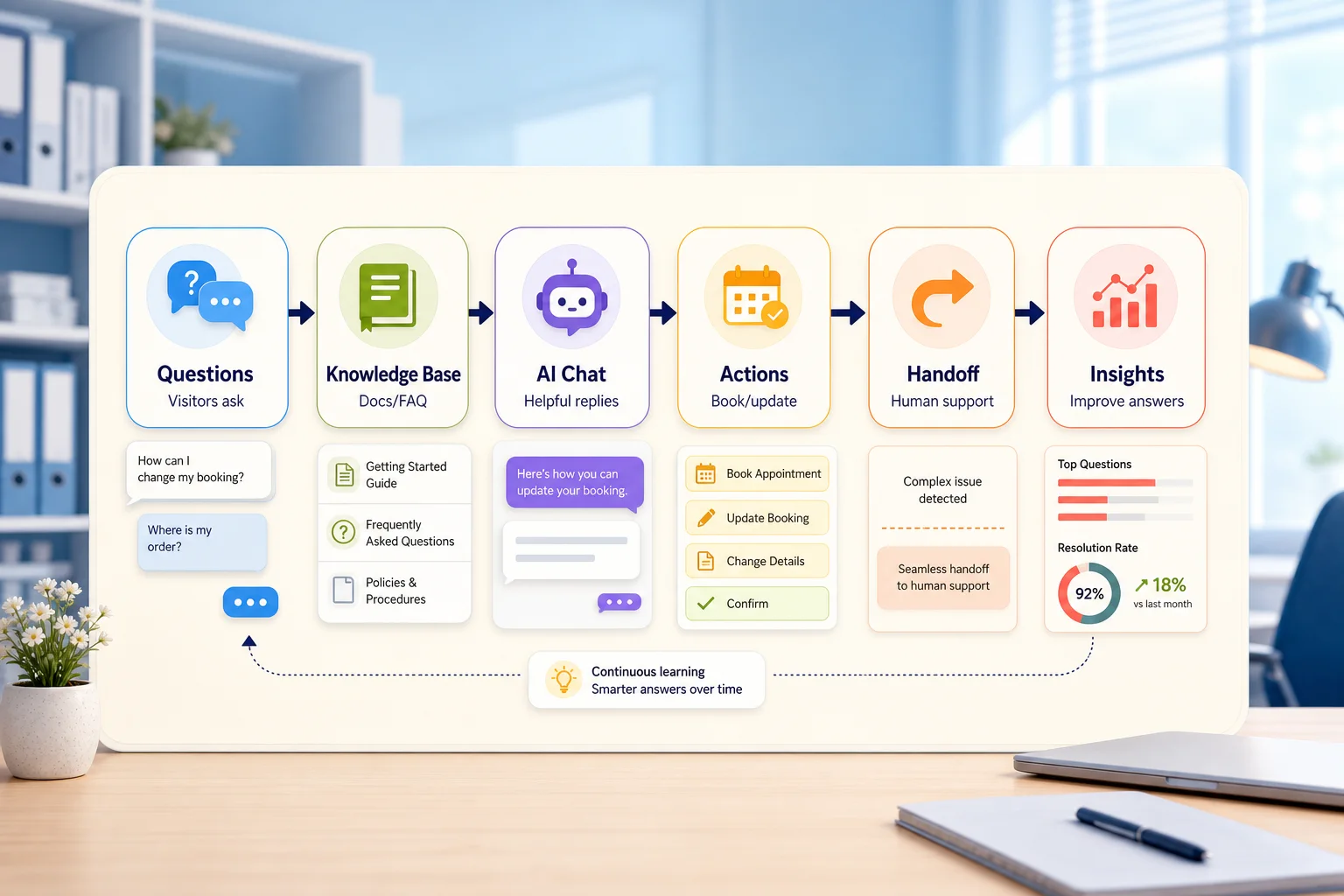
Cyberlife Development LLC's approach to the work
We always start with the real workflow: which system the request goes to, where the data lives, what needs to be automated, who handles the exceptions, and what needs to be reported. We then set up the necessary tools, integrate APIs, prepare the VPS or cloud environment, and document the handoff so that the system is capable of being maintained.
Typical implementation coverage
Discovery of workflows and the identification of technical needs.
Design of automation of forms, CRM, spreadsheets, reports, bots, APIs, dashboards, and other elements.
Set up of a VPS, configuration of the server, and installation of Docker/Nginx with integrated SSL, along with backups, monitoring, and other software in case the project requires hosting.
For the team: operating instructions with the inclusion of testing, error management, notifications, and simple use cases.
When to use this service
If you're choosing an intelligent technical configuration that aligns with business goals resulting in fewer manual changes, quicker reports, and more secure handoffs, or an automated solution that continues to operate post-launch, consider this service.
Check the nearest current service page (/ai-chatbot-development-services/) or send your workflow to Cyberlife Development LLC for automation.
What this page is actually addressing
Most teams don’t have a need for a new system. They want some part of their week to be less brittle. Someone is doing copy and paste of leads from an email to a CRM. Someone exports the same data every week. Someone does a check to see if a particular file is saved in a particular folder. These tasks are tiny enough to be ignored. Until they start to dictate the speed of your business.
This is the actual context for ai chatbot development. Rather, the real question is not whether this type of automation is modern or not. The real question is where the process currently breaks, who is responsible for the cleanup, and what would the process with automation look like where there is zero repetition in delivering the work that fulfills the same need.
For a new workflow in a small business, it’s best to take a narrow approach. Pick one workflow and set one trigger. Determine the reliable data. Decide where there should be manual review. Then, create the smallest working version before the other workflows.
Where the work usually starts
The first draft of a workflow should be a simple draft written in plain English. It doesn’t need to be the neatest draft, but it needs to tackle some important questions. The questions include determining what starts the workflow, what info arrives to the tool, what tool owns the records, who will be notified, what is the finish criteria, and what is the next action when something goes wrong.
The goal of automation is to be useful, but in its current state it will not add any value. If the workflow is vague, the automation will be even more vague. If your team cannot agree on a handoff, the software will only add to the confusion.
The best approach is to be slow at the start and fast at the end. Draft all the current steps of the workflow. Eliminate the steps that are left in place because the previous tool enforced them. PRemove the steps completely, but keep the manual review in place and allow the judgment to remain. Lastly, add to the automation for the steps that are repetitive and easy to verify.
Common Workflows Related to This Topic
Business-specific implementations show a degree of variation, but there are many similar patterns. A website form can generate a new record in the CRM, create a follow-up task, send a first response, and assign a record owner. A support request can be classified, matched to account data, and constructed for a review, and then sent to the appropriate person. A weekly report may gather data from multiple apps and deliver a brief summary prior to the Monday meeting.
Document-related workflows are also common. Invoices, intake forms, PDFs, contracts, and rows in spreadsheets often contain information that is organized, but is still in a format that is not structured. Automation can extract fields from documents, rename them, update entries in a database, and flag them for review.
Research workflows are also applicable. A workflow may collect disparate notes from a web page, spreadsheet, emails, and chats, and assemble a structured first draft for a human to review.
What Should Stay Human?
The most successful automation projects are the most transparent about what areas of their work need to involve people. Pricing decisions, customer sentiment, responses about legality, and healthcare issues, need to be reviewed by a human.
Automation is not a detriment, and in fact, is a positive for these cases. A process can be designed to thoroughly prepare all the information, offer a suggestion for the subsequent step, and require someone to approve the next step. This is indeed a time saving measure, but also protects the workflow from a common error of the trade where a process is designed to allow the system itself to create a business directed decision, which in fact cannot be explained.
For many Cyberlife projects, the design principle is "automate the prep, keep the approval." These systems can gather context, draft messages, and update records while displaying exceptions. Ultimately, it’s up to the user to decide if judgment is needed in that specific case.
Tool selection without tool worship
Tools matter, but only as much as the workflow they support. Some schemes only need a simple connector. Other workflows may require n8n, Make, or Zapier. Google Workspace, a CRM integration, a private database, or a small custom API may be needed. Other schemes still may require the use of OpenAI, Claude, or Gemini, or other models focused on the tasks of classification, extraction, summarization, or drafting. Some workflows may need the use of a VPS, Docker, and the added infrastructure of backups, monitoring, and logs as the workflow must run on its own dependable reliability.
A project starts off on the wrong foot when a tool is chosen based on a platform demo. An impressive tool is still the wrong selection if it adds no value to the workflow. A tool that integrates the chosen workflow may even be viewed as boring by the users.
In terms of evaluating AI chatbot development, a better checklist would be focused on the workflow. Can it be tested? Can errors be tracked? Can the handoff be understood by a non-technical person? Can the rules be changed without having to rebuild the entire system?
What to do before design
Before you begin, gather several examples of inadequate workflow. Create these examples, rather than using sample data. Show the unfinished example that contains a mixture of data, or exhibit an email that lacks clarity, or a spreadsheet with row questions. You can also show an invoice with an unusual vendor or supply a support ticket that is no longer useful.
Next, identify the intended outcome. It could be a CRM update, a dashboard, a task, a notification, a renamed file, a draft reply, a report, or a human review queue. The outcome should be clear enough that the team can verify the process functioned correctly.
Listing the exception rules early in the process is also helpful. What will halt the workflow? What will be given to a person? What is considered private? What is to be recorded? What is not to be sent under any circumstances?
Metrics of Success
Ordinary things are generally the best forms of measurement. Did a lead receive a quicker response? Did the report arrive without the need for cleanup? Did support requests spend less time in the wrong inbox? Did the owner know what was changed without using five different tools? Did the team spend less time copying and more time determining the next best decision?
Not every automation requires a return on investment model that is overly complicated. For a small business, time saved and mistakes avoided are often the only reasons the first project is approved. The important part is to measure the old workflow before replacing it, even if that measurement is not exact.
An automation that is even a little useful will simplify a task that is completed daily or weekly. If no one can see the difference, the project was probably too abstract.
What the first version should include
A first version that is useful needs to have a clear trigger with a visible outcome and a way to recognize when the workflow has failed. For example, if a form submission starts the workflow, the team should know where the record will be located, who owns it, what notifications will be sent, and the way exceptions are handled. If there are several data submissions that initiate a report, the owner should know which data submission failed instead of receiving a summary report that is incorrect and appears to be of high quality.
The same is true for anything else that you may use AI for. AI can summarize, classify, extract, and draft with the workflow around it. But examples are needed for inputs, outputs need to be reviewed, and logs need to be clear as to what has occurred. If the model has high uncertainty, the system needs to ask for help instead of just guessing.
The initial release must not have too many branches. It can be tempting to want to handle all edge cases and fully automate everything on day one, but that usually results in a brittle build. Focus on a prevalent case first. Add a human review queue and a feature after seeing where real exceptions are. A good place to start is the common case a human will need to review.
What are the issues
Insubstantial things cause automation to break. A CRM owner is not present. A spreadsheet tab is renamed. A vendor modifies an invoice template. A field name is updated. A model provides an answer that does not fit the account history, yet sounds sure. These do not justify not automating. They rather justify that there are validations to aid the process.
Automation is usually a success when designing good systems that fall back on what is missing. A workflow must provide relevant context to a user. It should stop when a field is missing and avoid filling in the answer. A sensitive message should be a draft.
That is what usually demonstrates the gap between a product demo and a business system that is fully functional. The demo focuses on the happy path, while the real system understands how to handle the chaos that is Monday morning.
When to seek out a partner
If the system is clear, tools streamline integration, and a team member can support it, an internal automation is no more than that. It is fine. It does not justify a partner to automate. If private data is being handled, if AI is needed, if the workflow concerns parts of the business that are not internal to the company (sales, customer support, finance or operations), then a partner to automate is a justification.
Cyberlife Development has the ability to chart out the process steps, create an initial version, and gift the team a workflow that is sustainable in the long-term. The goal is not a lengthy tech brief, the goal is a concise description that identifies the current time-wasting parts of a workflow and offers the ideal version.
Chatbot services that connect to operations
A chatbot should usually connect to lead capture, workflow routing, and the right channel experience instead of staying as a standalone widget.