
Cyberlife Development LLC specializes in assisting small businesses to implement document processing automation through planning, configuration, integration, deployment, monitoring, and the creation of practical handover documentation.
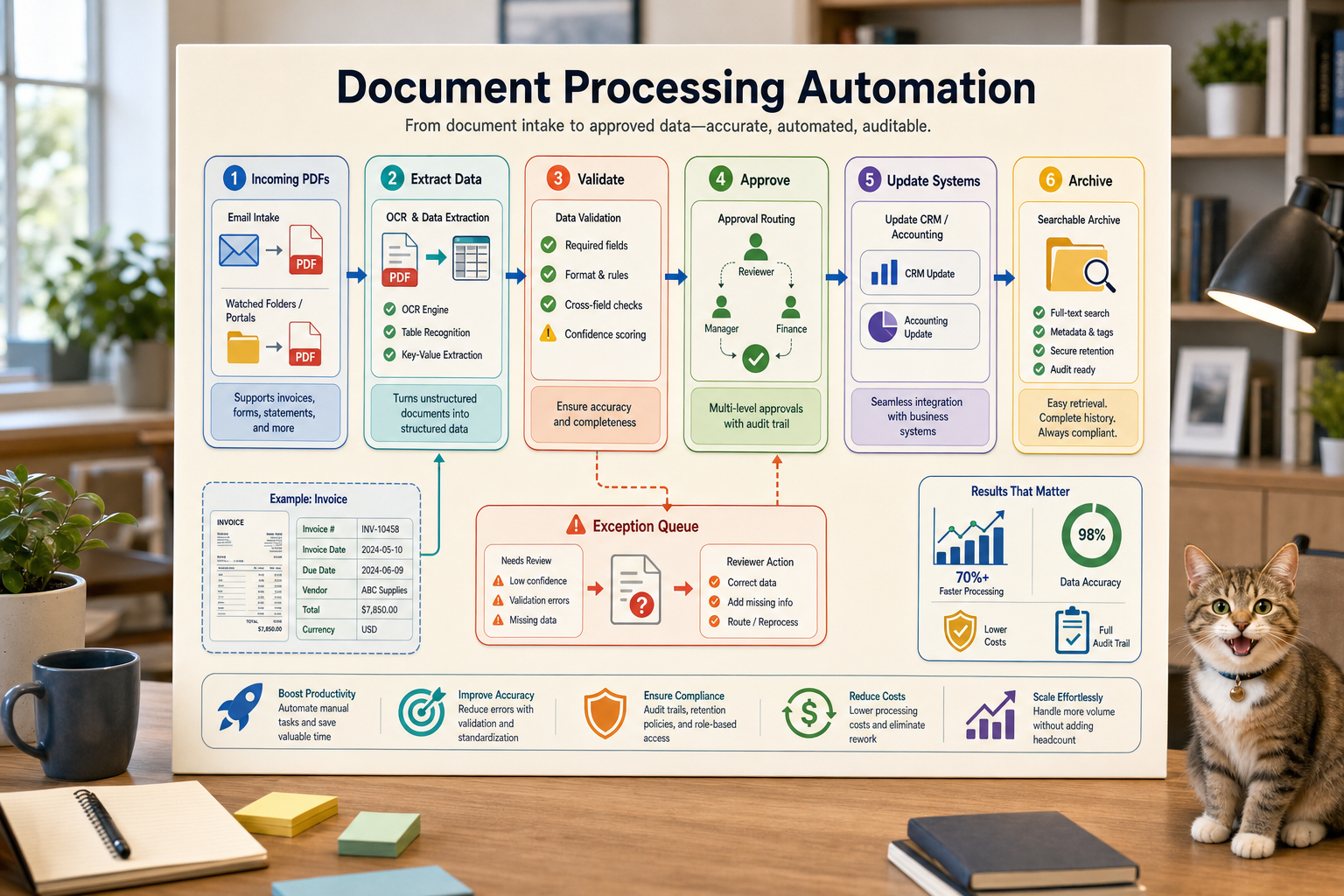
We start with the actual workflow: which system receives the request, where data lives, what needs to be automated, who reviews exceptions, and what should be reported. We then proceed to configure the needed tools, connect the required APIs, prepare the VPS or cloud environment when necessary, and provide a handover document to ensure the system can be supported.
Typical implementation scope
Workflow discovery and technical requirements.
Designing automation for forms, producing records in a CRM, spreadsheets, generated reports, bots, APIs, and dashboards.
Setting up a VPS, configuring the server, and setting up Docker, Nginx, SSL, and monitoring, as well as any other software necessary to host the project.
Designing the system with the required features and providing remediation for the most common errors with notifications and instructional guides.
When to use this service
Use this page when you require a reliable technical setup linked to a business outcome such as reduced manual updates, quicker reporting, more secure handoffs, or a hosted automation that continues functioning post-launch.
For the closest related service page (/ai-automation/) or to automate a workflow, feel free to reach out to Cyberlife Development LLC directly.
The problem this page really addresses
In general, no one wakes up in the morning with the goal of acquiring a new platform. No, the real goal is to make sure that a particular process is not so easily breakable. This includes steps like the copying of an email to a CRM, the copying of numbers to a report due at the end of the week, or checking to see if a particular file was saved in the right directory. While these steps may seem like something that can be neglected, in reality, they dictate the speed of the business’ responsiveness.
This provides an explanation as to where the automation of document processing is helpful. The goal should not be to modernize and innovate through automation. Instead, the goal should be to identify the places in a process where a break is most damaging, the people who are left to deal with the mess, and what repeatable and less damaging breaks in a process would look like.
For a small business, a good rule of thumb is to keep the first iteration small. Choose one process, identify the event that starts the process, determine the data, identify the point of an outcome that requires human review, and create a working version. Only then add more processes, or more automation.
Where the work usually starts
A good first step is a low-fidelity plain-language process map. It can be imperfect. It needs to answer some annoying questions: what kicks things off, what data needs to arrive, what app owns the record, who gets the alerts, how do you know it's done, and what do you want to have happen when something is out of place.
This is where many automation projects either get valuable or just become noise. If your team can’t agree on the workflow, automation is just going to create a bigger problem.
The best way to design systems is to go slow at the beginning and fast at the end. Write down the workflow, and eliminate steps that aren't needed because of a legacy system. Keep processes that require judgment manual, and automate everything else.
Common workflows connected to this topic
While most of these processes will have to be designed specifically for your organization, the overall steps are usually the same. For example, a web form can start a process that creates and assigns a new record in a CRM; sends an email; and captures a follow-up task. Similarly, an employee provides a request that, after information verification, captures a draft for review and then sends the request to the designated user. An employee can automatically receive the data that summarizes a report and are compiled from various systems before the next meeting.
Document workflows are another common starting point. Invoices, intake forms, PDFs, contracts, and even rows in a spreadsheet can contain structured data, but often it is in a format that is not ideal. Automation can extract fields, rename files, update records, and alert users to the fields that need to be reviewed.
Research workflows can fit this model, too. Rather than sifting through a combination of text, spreadsheets, emails, and message threads and asking someone to write the draft, you can automate the collection and structuring of the data and draft the document for the user to edit.
What should stay human
The safest automation projects know the limits of what should be replaced by automation. Pricing, judging sensitive feedback from customers, making legal or medical decisions, handling atypical complaints, and dealing with ambiguous documents all require a human check. This does not weaken your automation; it actually makes it stronger.
A good workflow is capable of providing context, recommending the next step, and preparing the next step for the user. This still saves time. It also counters the lack of accountability, which is the most common failure of system design: the system is capable of making decisions that your business cannot explain.
For the majority of your Cyberlife projects, the right approach is to "automate the prep, maintain the approval." The system is capable of collecting context, preparing the draft, and showing the justification for the change. The qualitative decision is still up to the user.
Tool selection without tool worship
Tools are integral to workflows, but should always reflect the outcome and not the other way around. Some projects require nothing more than simple connectors while others demand the full arsenal: n8n, Make, Zapier, the entire Google Cloud suit, CRM, integrated private databases, or custom API’s. Some projects require models like OpenAI, Claude, or Gemini for classification, data extraction, summarization, or drafting. Some workloads require a VPS, a Docker container, a backup solution, monitoring, and logs because the workflow is mission-critical and requires uptime.
Choosing the wrong tool is actually not that hard to do. It is easy to overly focus on a tool when showing a platform demo, rather than solving a business issue. Just because a tool is awesome does not make it the right solution for a workflow. Because a more simplistic boring workflow is often easier to use than a complex over-engineered system.
A better test for automation of document processing is: can the workflow be executed with the system standing by, can the system report problems, does the handover make sense to a non-technical person, is there a way the business can modify the endpoint without an entire system overhaul.
What to do before you build
Prior to drafting and building, bring in a few real world examples. Pretty sample data just does not cut it. Bring in a real half-complete form, an email, a confusing row in a spreadsheet, an invoice with a crazy vendor, or a support ticket with all the back and forth email chains appended.
Define the necessary output, and specify ways to accomplish it. Examples include a CRM update, a dashboard, a task, a notification, a renamed file, a draft reply, a report, or a queue waiting for a human review. Keep the output clear and concrete so the team can evaluate its success.
Try to describe the exception rules early. Under what conditions will the workflow be stopped? Under what conditions will the workflow be directed to a specific person? Under what conditions will the workflow be kept private? Under what conditions will the workflow discover a logging requirement? Under what conditions will the workflow be executed automatically?
The Best Evidence that Automation Worked
Change can be measured using simple metrics. Were leads responded to more quickly? Were reports sent and received with no manual edits? Were support requests sent to the appropriate email? Did the person in charge understand what changed without opening five different applications? Did the team spend more time on the things that mattered instead of manual copying?
The benefits of simple automations can be quickly weighed in time saved and error avoidance, especially in small businesses. The important part is to measure the impact of the automation combined with a simple evaluation workflow.
A first simple automation that makes a process or task daily or weekly more convenient will be successful. If there are no noticeable improvements, the automation was most likely a failure.
Related Search Terms
It is important to consider all the different ways people could describe document processing automation. While the specific terms people use to do a search should be considered, the page should not read like a search engine keyword list. The page should be directed towards the business owner.
Thus, the final draft must include the relevant terminology with an explanation of the actual work done: mapping the process, linking the tools, managing exceptions, and providing the business with a workflow that is auditable.
Components of the Initial Draft
For the first draft to be useful, it must include a clear trigger, a clear outcome, and a mechanism to identify when something goes wrong. When the workflow is initiated by submission of a form, the team must understand where the record will be located, who will own it, what notification will be sent, and how exceptions will be processed. If the workflow is initiated by a report and multiple data sources, the owner must be informed of which data source was responsible for the error and must not be left with an undeserved, polished summary report.
The presence of AI in the workflow makes the need for explicit mechanisms even more critical. AI's capabilities may include summarization, classification, data extraction, and even drafting, but the surrounding framework must remain auditable and clear. The absence of sufficient inputs, lack of clear outputs, and the logging of actions must be evident. If the AI is uncertain, the workflow should not be left to run without constraints.
The first release should minimize the number of branches. Although it is tempting to try to automate all edge cases from the start, that usually results in a highly fragile solution. Instead, start with the most common path with human oversight, and only begin to add the less common exceptions once the business has evaluated the system.
What can go wrong
Automation is boring. A field name changes, a CRM owner is missing, or a tab is renamed in a spreadsheet. A vendor changes an invoice format, or a recent model drafts an answer that is confident in tone yet inaccurate when considering the account’s history. These failures should not deter someone from moving towards automation; they are opportunities for improvement with the correct feedback mechanisms.
When a message is sensitive and will be sent to a customer, the message should be paused for consideration with the correct context rather than a guess being made. When automation is designed well, the fallback behavior is what is expected, the workflow will fail but will send the needed context for someone to address the failure, and the workflow will be interrupted.
The difference between a functional business system and a system that only runs a demo is that a system that runs a demo only shows the happy path of the system. A functional business system has the capabilities to address the unexpected failures that come along.
When to ask for help
If a process is clear and use-case connected, a simple automation is fine, but if systems are fragmented and the way the systems are connected is through private data, then the use of AI for customer facing services that could be monetized are things that need your help, like sales, customer support, finance, or operations, then the use-case becomes much more complex.
The best place to start, when designing your way to optimize a business use-case, is not the long technical overview that focuses on the business; rather, it is an overview of the current state of the use-case that focuses on loss of productivity due to the current state, and what the future of that use-case should look like to solve that loss of productivity.
Operations around document automation
Document automation often feeds workflow routing, dashboards, integrations, and hosted automation services.