
Cyberlife Development LLC specializes in assisting small businesses with the comprehensive implementation of salesforce and hubspot integrations, including the planning, setup, integration, deployment, active monitoring, and detailed handoff documentation.
When workflow automation services are the right fit
This page is for business owners who need working automation, not a software catalog. A project may start with salesforce and hubspot integration, Salesforce integration, salesforce outlook integration, jira and salesforce integration, QuickBooks integration, linkedin pipedrive integration, or pipedrive quickbooks integration. The actual service is not just connecting apps. It is mapping the handoff, deciding which data can be trusted, building the workflow, testing failure cases, and leaving the team with a system they can maintain.
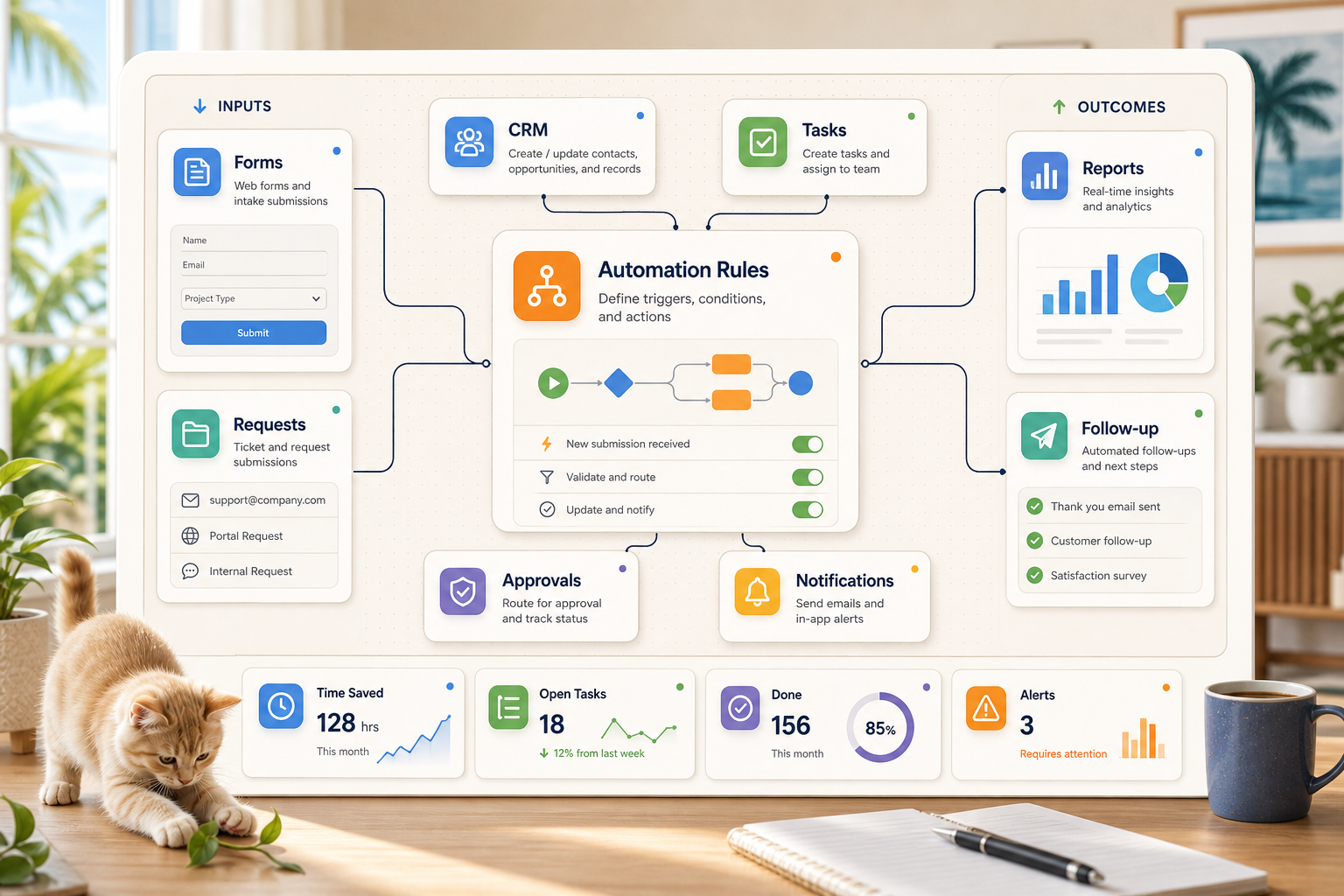
Cyberlife Development LLC starts by documenting the workflow: which system receives the request, where the data lives, what needs automation, what requires review, and what should happen when something fails. Then we configure the tools, connect APIs, prepare hosting or VPS pieces when needed, and hand off clear documentation so the workflow does not depend on one person's memory.
The problem this page is really trying to understand
Most people don’t want a new tool to manage. Ultimately they want to make a part of their week less fragile. Tasks of copying lead details from emails to a CRM, exporting the same numbers each week, and confirming a document was archived properly are more convenient to ignore, and are often delegated, but control how quickly a business can essentially respond to its needs.
That is how and why we place context to a service geared toward automation workflows. The key question isn’t whether automation captures attention. It’s what process is being carried out now that breaks, who needs to then cleanup the mess, and what would that look like if there were fewer steps and the system executed the steps the same way.
For small businesses, the first model should be limited. You will choose one workflow, set the trigger, and determine the trusted data. You will also decide where the person reviewing the result should be. Afterward, focus on building the smallest working model and refrain from linking more systems.
The first step
The first step should be a simple to read workflow. Aim for an easy system and don't get worried about achieving a flawless diagram. It should provide answers to a few challenging questions. These include what is the starting point of the system, what is the arriving information, and which tool is the record owner. Also, who is the definer of notification, what is the system's completion, and what should be the system's response to an error?
What you will find is the combination of a good system and automation. A vague workflow is bound to lose meaning in automation. The system should aim for an even distribution of control between all the agents.
Remove steps that were added because an old tool demanded them. Maintain special judgment in the case of a human approval.
Connected Workflows
While the specific details change between different companies, many aspects of automation are the same between different companies. For example, the automation of a website form can result in a new record being created with an owner in a CRM, a first reply being sent, and a follow-up task being created. The automation of a support request can result the request being categorized and the matching account information being drafted for review, as well as being routed to the appropriate person. It can also be an automation that generates a weekly report that collects information from different tools and sends the report in time for the Monday meeting.
Another common example of an automation is an invoicing process. Forms, PDFs, contracts, and rows in spreadsheets often have structured data in unstructured and dirty formats. Automation can help extract data from those formats, rename documents, update records, and flag data for uncertain cases.
This also applies to different research related tasks. Using an automated solution to collect, format, and organize a draft from various data sources is more efficient than assigning a person to collect data from a set of different sources like webpages, spreadsheets, email, and chat messages.
Remaining Manual Tasks
The most successful automation projects identify where the line has to be drawn around automation. Examples of where manual tasks are still needed are pricing decisions, customer interactions, and the assessment of novel/unusual complaints. Automating aspects of a task without having a human review an output means the process is weak.
Completing a work task can be an automated process where information is presented, and the next step is suggested. This approach to automation also saves a company time, and eliminates a common issue where a system is used to make an explainable business decision.
In Cyberlife, project designs often use the “automate the prep, keep the approval” approach. The system collects the context, drafts the message, updates the record, and explains the exception. The user decides when to use their judgment.
Tool Choices Without Tool Worship
Some workflows become easier or more possible to complete with certain tools, but tools should never dictate the workflow. Some projects may require integration and automation tools like n8n, Make, Zapier, Google Workspace, or CRMs. Other projects may require the use of private databases or OpenAI for machine learning. The installation of a Virtual Private Server (VPS), Docker, and other forms of monitoring and logging may become necessary for workflows that need to run a high level of reliability, even without user intervention.
A tool is often perceived to be a good fit for a workflow because of a demo or a business solution that is perceived to be innovative, and as a result, an impressive tool. A simpler solution that the team understands is often a better fit than a complex solution that is intimidating.
Checklist-based approach for workflow automation usually ends up in the right place when the tools to be evaluated allow the workflow to be broken into testable pieces, results can be monitored, and a non-technical person is able to understand the process being followed, and the business is able to adjust the rules of the process without major effort.
What to Prepare Before Building
In the phase before construction, you should be evaluating what you will use, and the first step is the most important: go look for your examples. Don't look for the perfect example. Don't use a glossy example. Don't use the complete and right example. Use a messy email, a half-filled form, a row in a spreadsheet that doesn't make sense to you, an invoice with a name you don't recognize, or a support ticket that has been going back and forth.
Then specify what type of output you want from the workflow. A CRM update? A notification? A report? Draft replies? An update to a task? A dashboard? A renamed file? A manual review queue? The output has to be specific to the point the team can confirm if it was accurate.
It is also helpful to include exception rules at the beginning. What should interrupt the workflow? What should be assigned to a person? What data is too sensitive? What information should be logged? What is too sensitive to be sent automatically?
How to Evaluate if It Worked
The best measurements are the most ordinary. Did the report arrive with no manual corrections? Did the lead arrive at the report sooner? Were support requests routed correctly? Did the owner know what was done without opening up five different tools? Did the team balance out the time they wasted with the new tool?
Most automations do not need a complex ROI calculation. Often, especially for a small company, the first project is completely justifiable purely based on time and mistakes. The key to automation is always measure the manual workflow first.
The ideal first automation is one that makes one manual task easier to do with each passing day or week. If the team can not tell the difference, the project was too abstract and was not worth doing.
A practical first release should also include a clear ownership map. If a lead comes from a form, the team should know which CRM receives it, who owns the record, what notification is sent, and what happens if the required field is missing. If a report pulls from several tools, the owner should know which source failed rather than receiving a polished but wrong summary. For integration-heavy work, this is where workflow automation services become useful: the value is in the checks, logs, review queue, and handoff notes, not just the connector itself.
That same discipline applies whether the project is a Salesforce integration, a QuickBooks integration, or a smaller handoff between email, spreadsheets, and a CRM. Start with the common path, leave edge cases for manual review, and expand only after the team sees where exceptions actually happen during real sales, support, finance, and operations work.
Problems you may encounter
There are many reasons automation may run into errors, but most of them are uneventful and boring. A field has been altered, an owner for an entry is missing in the CRM, a spreadsheet tab has been renamed, an invoice has a new formatting style, or a drafted response sounds confident but doesn't match existing records. These automation issues are reasons you should not avoid automation. They give you the opportunity to create automation that allows for these issues.
The best automation design has mechanisms to cover for it. Fallback behavior dictates that when there are no sufficient values for an automation step to run, the automation should not run at all, and a notification is made to give the context of the failure for manual intervention. It should be left for review in case of an automation failure, and a message is made client facing.
This turns out to be the difference between a good demo and a rapid prototype. A good demo will only show the happy path. A good prototype will have a deep understanding that certain logical scenarios will absolutely not go according to expectation.
When to seek external support
A small, simple, internal automation is perfectly fine if the process is straightforward, the tools integrate seamlessly, and a team member is able to maintain it. If the automation will be larger in scope, will reach to various teams, will include personal or sensitive data, or will include elements of sales or financial operations, then the best course of action is to seek external support.
Cyberlife Development can chart the processes, create the initial draft, and provide a sustainable method for the team. An ideal first step does not entail a lengthy technical document. Rather, it consists of a concise overview of a current time-wasting workflow and the recommended alternative.
Where workflow automation connects next
If you are mapping a workflow, these related pages help connect the build to implementation details, reporting, documents, and revenue follow-up.