
Cyberlife Development LLC transforms small businesses’ aspirations for automated reporting into fully operational implementations through planning, set up, integrated deployments, ongoing support and monitoring, and tactical operational documentation.
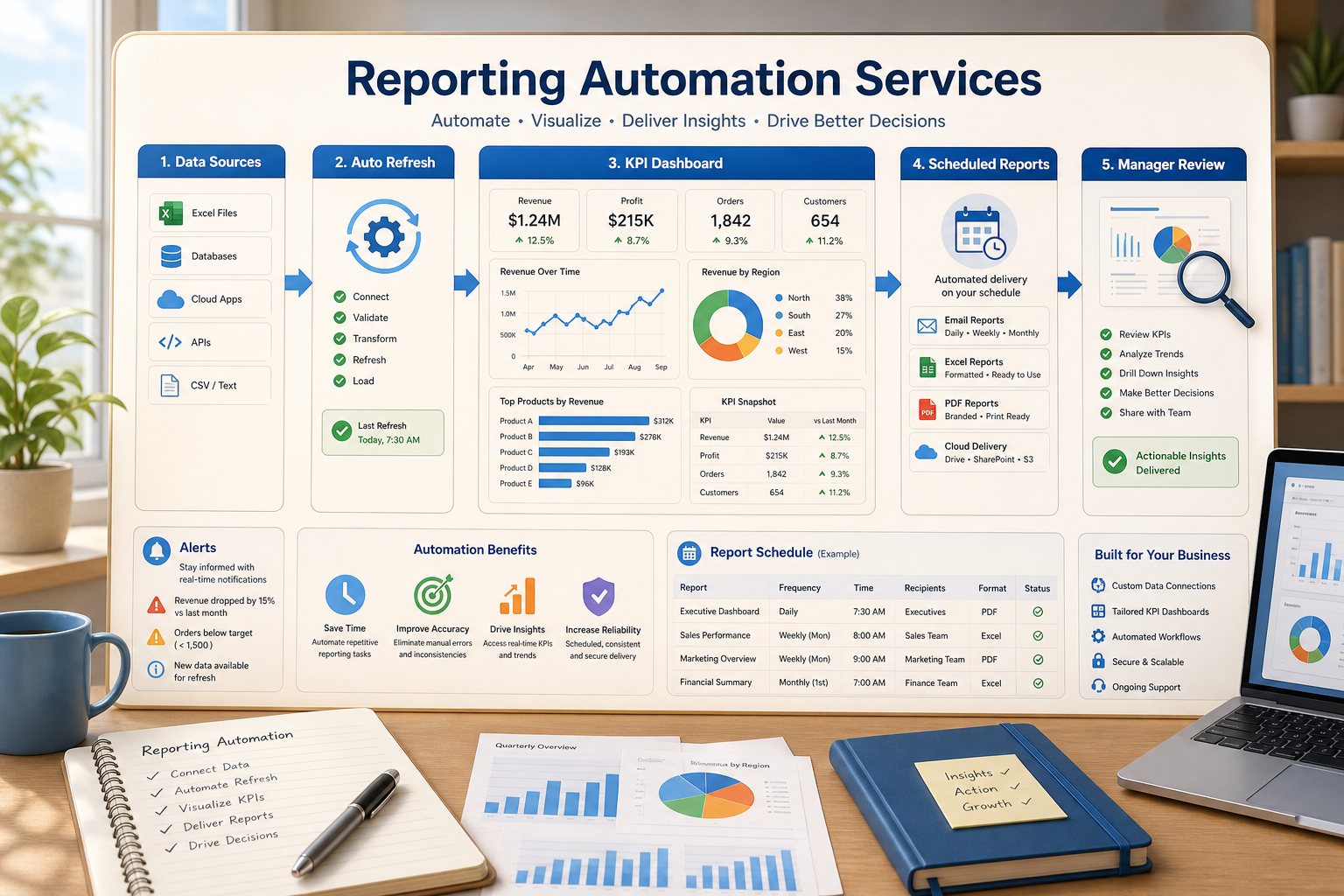
We consider the real workflow: which system the request is submitted to, where the data is stored, what needs automation, and what is reported and who reviews the exceptions. Based on that we set up the required tools, connect the required APIs, set up the VPS or cloud space as required, and document the handoff for system stewardship.
Typical implementation scope
Workflow discovery and technical requirements.
Automation design for forms, CRM records, spreadsheets, reports, bots, APIs, or dashboards.
VPS setup, server configuration, Docker/Nginx/SSL setup, backups, monitoring, and installation of the required software when the project requires hosting.
Testing, error management, setting up alerts and simple operating instructions for the team.
When to Use This Service
Use this service to automate time-consuming manual tasks. This service can increase the speed and safety of data transfers in your systems by reducing the need for frequent manual updates, updating reports automatically, or continuously running your post-launch system automation service.
If you need this service to automate a work flow, see the closest available service page (/automated-reporting-dashboards/) or reach out directly to Cyberlife Development LLC.
What This Service Really Addresses
Most employees don’t actually want a new system. They want to remove cumbersome and untrustworthy steps in their work. For example, they want to stop having to copy the same email lead details to the CRM step. They want to stop having to export the same spreadsheet numbers to the folder step. They want to stop having to check if the document is saved in the right folder. These steps are easy to overlook, and are small enough to become the constraints on the speed and responsiveness of the business.
This is the functional context for reporting automation services. The not-so-useful question is, “Does automation sound modern or not?” The useful question is, “Where do the steps of the current process break, and who is forced to perform the clean-up, and what would it look like if the repetitive steps of the current process were automated?”
For small businesses, the first automation implementation should be a short-lived system. Choose a single step in the process to automate. Identify a triggering event in the process. Choose which data are fit for automation. Identify a review step for the automation. Finally, implement the automation, and integrate additional systems.
Where the work usually starts
Mapping the workflow in plain English is a decent place to start. Accuracy isn’t as important as identifying the steps that need to be documented. These generally include who/what starts the process, what information comes in, which system maintains the record, who gets tasked, what constitutes done, and what to do if there is an exception.
Automation projects either start to have value or become a distraction at this stage. If a vague workflow is documented, vague automation is what will be delivered. If there’s no agreement on the process step handoff, the software will do nothing more than perpetuate the confusion.
It’s better to slow down now and speed up later. Document what the process is, not the way other systems have forced a change. Keep steps that require a judgment call and are therefore a process bottleneck. Automate the steps that are repeatable and don’t require a judgment call.
Common workflows connected to this topic
Each business is unique, but certain patterns are seen across industries. An example of an automated workflow is when a website form creates a CRM record, assigns a record owner, sends an initial email, and creates an email task. A support request can also create a record and then route the request after it has been categorized and matched to the user's account information and drafted for review. Lastly, a report can be generated that pulls data from multiple platforms and sends an email with the summarized data prior to the Monday meeting.
Document workflows often involve intake forms, PDFs, contracts, and structured information that is often trapped in a disorganized manner somewhere in an invoice or recorded in a spreadsheet. Automation can extract data, change field names, update information, and handle items that require more discretion.
Research workflows can benefit from a similar approach. Creating the first draft can be a structured workflow to combine the inputs, as opposed to having someone draft the first copy by manually collecting note inputs from disparate locations such as websites, spreadsheets, chats, and emails.
What should remain human
Projects with the least risk of detriment to a business the most accurately describe the gaps that should be left human. Sensitive customer interactions, pricing decisions, legal judgments, medical guidance, and complicated complaints that stem from unforeseen issues all require a human check. Instead of offering a gap in the automation process, it adds value.
A workflow can automate a lot of the process of suggesting the next step that needs to be taken and collecting the approval to carry it out, which still saves a lot of time. This is also part of the solution to a larger problem in the automation of a business: allowing a system to carry out decisions that a business cannot justify in the future.
For many Cyberlife-related projects, it is best to design the system such that the automation takes care of the majority of the process and the prep is the responsibility of the system, with the approval of the prep being the responsibility of humans. The system should be able to do things such as gather the context, draft the message, and update the records, with the justification of the gap being the responsibility of a human.
Practical Approach to Tool Selection
While a tool can impact the overall process, it may not be the primary factor in most workflows. There are tasks that require simple connectors, while some may be more suited to n8n, Make, Zapier, Google Workspace, a CRM integration, or a private database and a custom API. You may require OpenAI, Claude, or Gemini, if you need a model for classification, extraction, summarization, or drafting. Sometimes, you need a VPS, Docker, backups, monitoring, and logs because the workflow has to run reliably without someone watching it.
Selecting the wrong tool happens when you start with a platform demo rather than a business problem. A tool can be very impressive, but still be the wrong tool for the workflow. A simple setup that no one is going to touch is often worse than a setup that is more complex, but is a boring build that the whole team can understand.
The better checklist for choosing a reporting automation service is simple: can this workflow be tested (is it what's expected), can errors be viewed, can the handoff be understood by someone with no technical background, and can the business change the rules without starting over.
Things to do and think about before building
Collect a few real examples before building a workflow. Avoid using examples that are perfect. Use a messy email, a half-filled form, a spreadsheet row that makes no sense, an invoice with a vendor name that makes no sense, or a support ticket that you are trying to solve without any contact with the support team.
Then outline what outcome you expect to see. That could mean an update in the CRM, a dashboard, a task creation, a notification, a renamed file, a draft reply, a report, or a queue for a human reviewer. It helps to be as precise as possible with what the outcome should be, so the team will know for sure if it does the job.
It can help to specify exception rules up front. What should end the workflow? What should be briefly routed to a human? What data is considered private? What should be logged? What should never be sent without human intervention?
Determining Success
The best metrics are the ordinary. Did the sales lead receive a faster response? Did the report arrive clean without any manual intervention? Did the support requests incorrectly routed finally reach the right inbox? Did the owner finally find out what was changed without having to open five different tools? Did the team spend less time copying and more time deciding?
Not every automation needs a detailed ROI. For a small business, time saved and mistakes avoided is reason enough. It really is about measuring an employee's workflow step and replacing that, even if the measurement is rough.
An automation that should work best is one that consistently improves a daily or weekly task. If people can't notice the difference, your project was probably unnecessary.
What the first version should include
The first version should include a clear actionable step, a visible outcome, and the ability to identify a breakdown in the system. For instance, if a workflow is automated upon a user submitting a form, the team should know record ownership, how the tool notifies the owner, and how the system manages exceptions. If a report is automated from disparate data sources, the owner deserves to know which source(s) caused the error rather than receiving a cleaned up, false report.
This is critically necessary if AI is a part of the automated workflow. The purpose of AI in an automated workflow is to summarize, classify, extract, and draft. This assumes the workflow is structured in a manner that can be tested. It also assumes that examples of the inputs and outputs are available for review, and that a record exists to show what actions were taken. If the system is in a state of uncertainty, it should request assistance rather than assume a false state of certainty.
Keep your first release simple with as few branches as possible. Automating every edge case may seem valuable, but it results in a fragile build. Focus on the common path first. Build a queue for exception reviews. Then iterate on the workflow as business needs dictate.
What can go wrong
The failure of automation is often subtle. Fields may change. Tabs on spreadsheets may disappear, just like your missing CRM owner, or a vendor may reformat an invoice. Even an AI answering a question may not align with the business. Automation isn't the problem, but checking controls is.
Good design should always have controls. Fallbacks for failures should be informative and allow the user to fix the problem. Missing data should not be augmented with assumptions. If automation especially affects the customer, it should be a draft for approval.
Happy user stories should be clear in tools they claim to build for business purposes. However, good automation and tools know how to react in a more fluid and less predictable business day, i.e., the messiness of Monday.
When to ask for help
Internal automation is enough for straightforward, already integrated processes that a team member can maintain. Custom help should be considered for other contexts. Examples include integrating multiple systems, using private data, AI, or automation that crosses the core departments of a business (sales, customer support, operations, and finance).
Cyberlife Development can analyze the workflow, create a first build, and hand off a process the team can sustain. The most effective starting point is not a lengthier technical brief. What works best in this case is a brief description of the workflow that is currently wasting time and what can be done to improve it.
Data flows worth connecting
A dashboard is more useful when the source workflows, lead data, and document inputs are automated before the report is built.