
Cyberlife Development LLC assists small businesses with the entire process of bringing AI sales agents into their operations. This includes planning, setting up, integrating, deploying, monitoring, and creating documentation for the handoff process.
Cyberlife Development LLC's Approach
We begin with the current workflow and the system that receives the request, where the data is stored, what elements require automation, who is responsible for reviewing exceptions, and the report requirements. After this, we set up the necessary tools, automate at least one interface, set up the VPS or cloud environment as needed, and create documentation for the handoff process.
Standard Implementation Provides
Discovery of the workflow and setting technical requirements.
The designs and the implementation of workflow automations for forms, CRM entries, spreadsheets, reports, bots and APIs, and dashboard integrations.
VPS setup with provision of infrastructure for hosting the project including server setup, Docker, Nginx, and SSL configuration, backups, monitoring, and installation of required software.
Development of error handling, testing, notification systems, and operational guide for the team.
When to use this service
This is the page to consult for a reliable piece of tech that delivers a business imperative of zero or minimal manual updates, quicker reports, and more secure domain handovers, or post launch hosted automation.
Check the most similar service page (/ai-automation/) or email your automation workflow to Cyberlife Development LLC.
The problem this page is really about
Very few companies, teams, or individuals wake up looking for a completely new platform. What they want is for a certain time of the week to be less brittle. Someone copies leads to the CRM from emails. Someone exports the same numbers every week. Someone confirms a file is saved in the correct folder. These are small activities that can easily be forgotten. However, these can also dictate how quickly the business can respond to time-sensitive opportunities.
That is the working definition of lead generation automation. It is simplistically tempting to think that because most automation is modern, the real question is how to identify and fill the gaps in a process that requires human manual labor when in fact automation is about the solution to unsolved problems in the workplace and the design of a process that involves minimal risk where tedious repeatable tasks are automated.
For a smaller organization, the first iteration of automation should be somewhat constraining. Choose a single workflow and define a single trigger. Accept only a single data point and determine a single workflow touchpoint. Then design the system.
The Starting Point
Describing a process should be the first starting point and should be in plain English. It should not describe an ideal process, but rather address the reality of the existing process and answer the following questions: How is the process started? What data is received? What tool distributes the record? Who is the recipient of the notification? How is the process deemed complete? What are the consequences of an unexpected event and what is the response?
This is where many projects aiming to improve a process either become useful or are perceived as disruptive. If the process is poorly defined the automation of that process will also be poorly defined. If a team cannot describe the handoff in a process it will be software that moves the confusion.
Aim for a system that is faster, but less constrained. Document the process as it is. Retire any process steps that are redundant or are simply a result of the limitations of an automation tool. Leave human judgment where it is important, but automate the repeatable and low risk to be verified tasks.
Common workflows connected to this topic
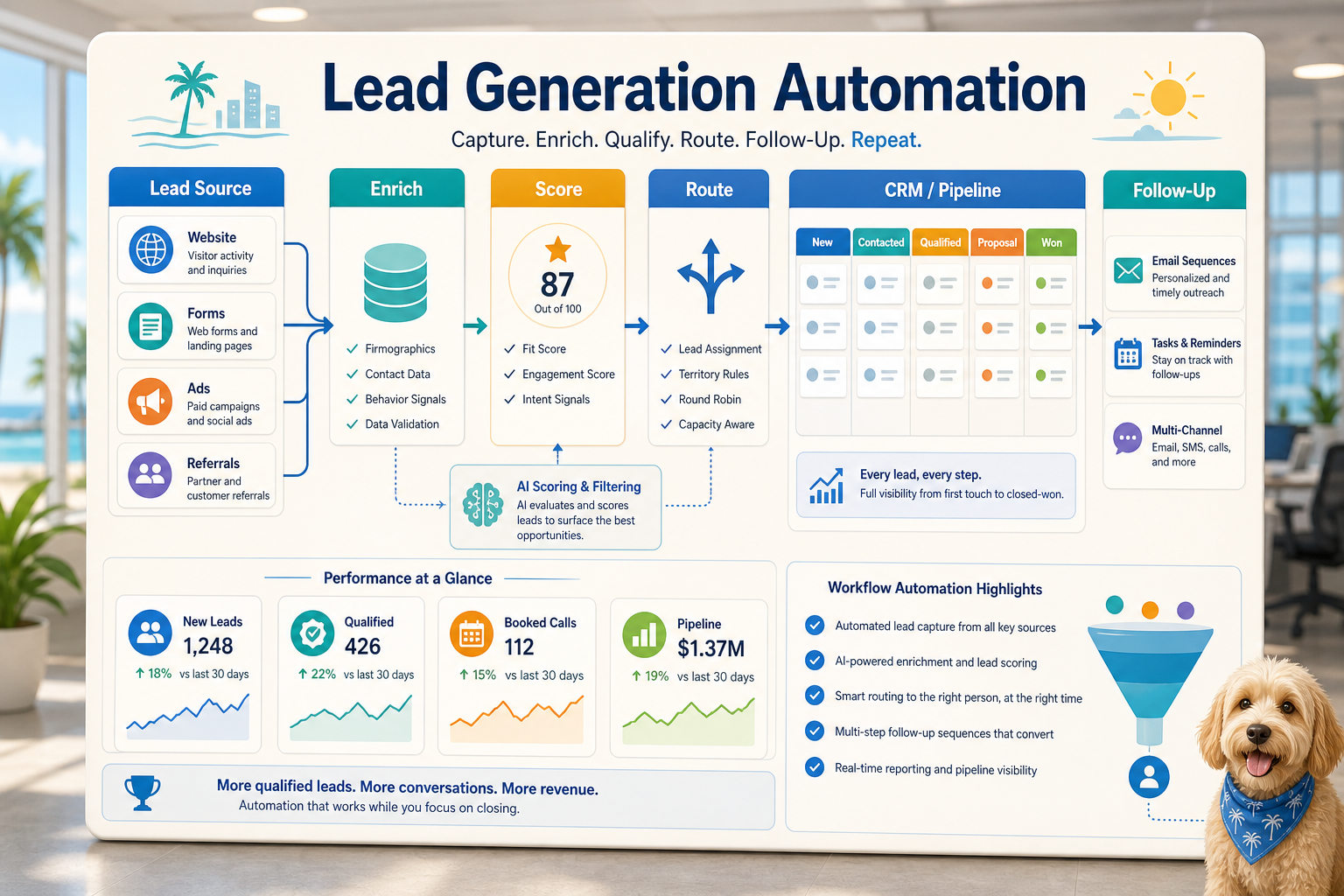
While each business puts their own spin on it, the core principles of automation remain the same. A web form can trigger the creation of a record within a CRM system, assigning an owner, sending an initial reply, and creating a follow-up. A support request can be categorized, matched to account info, generated through a review prompt, and allocated appropriately. A weekly status report can draw upon multiple tools to provide a summary before the Monday meeting.
Document workflows are another great example of automated processes. Incomplete data can be thrown out because, for example, invoices, intake forms, PDFs, contracts, and even rows on a spreadsheet can consist of neatly structured data, albeit presented in a messy way. Automation systems can extract information, rename files, update records, and flag uncertain cases for review.
Research workflows can also be automated. This can be used to eliminate the need for a person to gather a collection of disparate notes from websites, spreadsheets, emails, and chat threads. A workflow can collect the notes, create an initial draft for the person to check, and provide a structured output for the final document.
What should stay human
The most effective automation projects are transparent about the steps that should be undertaken manually. There are examples of things that just shouldn't be automated — the judgment calls in pricing, sensitive responses from customers, legal or medical determinations, out of the ordinary complaints, and documents that require a higher level of discernment. These examples do not weaken an automation effort. In fact, they add to the automation effort's overall effectiveness.
An insightful automation can prompt the next step, ready the info, and, most importantly, ask for a decision. It cuts down on the time and effort a task takes, and solves the problem of letting the system reach a decision that, once again, the business cannot explain.
For many Cyberlife projects, the design idea is "automate the prep, keep the approval." The system is capable of gathering context, drafting messages, updating records, and displaying exceptions. A person decides when the situation warrants a judgment call.
Tool choices without tool worship
Some projects require the use of certain tools, workflow connectors, etc. Other projects require the use of tools such as n8n, Make, Zapier, Google Workspace, CRM integration, a private database, or a small custom API. Other projects may require the use of OpenAI, Claude, Gemini, or other models for the tasks of classification, extraction, summarization, or drafting. Other projects may require a virtual private server, Docker, backups, monitoring, and logs because the workflow must be run reliably without user intervention.
Making the wrong choice of a tool occurs when a project starts with a presentation of a platform rather than a presentation of a business problem. In order to implement the workflow, it may be better to use a tool that is perceived as boring but is useful and understandable to the employees, rather than using a tool that is overly complicated and will not be used.
When using automation for lead generation, the workflow is better if it can be tested, if it is possible to see the errors that the workflow is creating, if the workflow is understandable to a non-technical person, and if the business is able to change the rules of the workflow without incurring significant costs.
What to prepare before building
Before a workflow is built, it is better to use an example that does not look perfect. It may be a messy email, an incompletely filled form, a confusing row of a spreadsheet, an invoice with an unfamiliar or strange vendor name, or a support ticket that has caused an increasing number of communications that work is creating.
Next, specify what you want this process to produce. While it could be any number of things, this could include things like an updated CRM, report, dashboard, task, notification, renamed document, reply, or a request for review. Be precise enough to answer the efficacy of the process.
Be upfront with some rules for exceptions. What data will stop the process? What data is private? What data needs to be logged? What do you want to route to an individual for a manual review? What case do you need to review for specific reasons prior to its processing? What do you want to be done manually and will never be done automatically?
Measuring Success
The best metrics are anecdotal. Did the lead get a faster response? Did the report arrive without manual cleanup? Did the report get routed to the correct support request to avoid the backlog? Did the recipient know what was legible changes without opening five tools? Did the the team less time creating the report and more time with the controls?
Most automations do not need a complex cost-benefit analysis to justify the time to implement. For a small business, the time saved and the mistakes avoided will easily justify the the first automation. The most important step for automations of the first workflows is measurement, regardless of the effort expended.
The task to automate should be frequent and easily noticeable to the users. If no one knows a task was automated, the task is too abstract.
The page should make the practical work clear: mapping the process, connecting the tools, handling exceptions, and leaving the business with a workflow that can be checked and maintained.
What the First Version Should Include
The first version should be useful and include a clear trigger, visible result, and detectable failure. For example, if a form submission is the start of the workflow, the team must know where the record will be created, who the owner is, what notification is sent, and how exceptions will be resolved. If a report starts from multiple data sources, the owner should know which data source fails instead of receiving a final report that is polished but wrong.
This can be even more important with Artificial Intelligence. A good AI can summarize, classify, extract, and even draft. However, a workflow system that is built around it still has to be testable. At the end of the day, inputs should be clear and exemplified, outputs should be reviewed, and logs should clearly reflect what has happened. If a model has uncertain outputs, the system should ask for assistance, not just remain silent and pretend.
The first release should have a linear approach, avoiding many branches. It's easy but tempting to automate every edge case from day one. However, that's a fragile approach. Start with the majority path, build a human review queue, and automate the rest when the company starts seeing the real edge cases.
Common Failures
Automation is boring. A field name changes. A CRM owner is missing. A spreadsheet tab gets renamed. A vendor changes an invoice format. A model drafts an answer that looks confident, but it does not align with the account history. The presence of such cases should not be reasons to avoid automation. Always build automation with such checks.
Good automation should be designed with a fallback. If an automated workflow reaches a step that is missing data, the workflow should pause rather than be completed with guesses to answer the missing data. If a message to the customer is unfinished and the system believes it's safe to send, automation should pause rather than be sent.
That is the difference between an automation demo and a working business system. The demo looks only at the happy path, while the business workflow understands the business system is built for the real world and the surprises it has to offer.
Seeking assistance
Simple internal automation and integration are fine when the process is clear and the internal tools are connected, and someone on the team is willing to maintain it. However, custom work automation becomes a necessity when the workflow stretches to more than one system, uses private data and needs an AI interpretation, or crosses the company’s core systems for sales, customer support, finance, or operations.
Cyberlife Development can outline the workflow, construct the initial version, and provide the team with a process that they can sustain. The best starting point is not an exhaustive technical brief. It is a concise description of the workflow that is currently inefficient and what needs to happen in place of it.
Revenue workflows to connect
Lead generation works better when follow-up, scoring, reporting, and customer conversations are part of the same operating system.