
Cyberlife Development LLC enables implementation of Voice AI through planning, setup, integration, deployment, monitoring, and practical documentation.
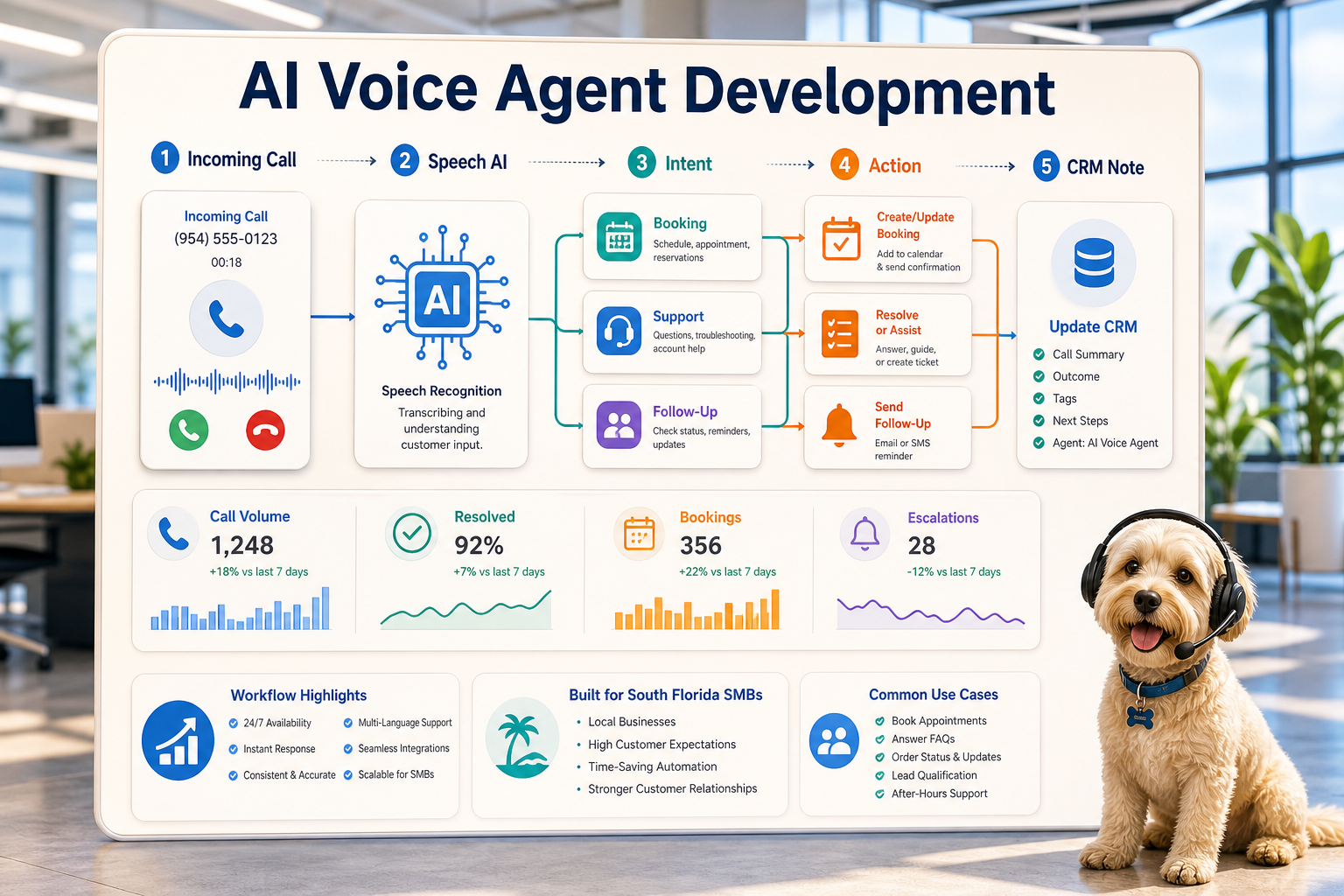
We begin with the actual use case or the actual workflow: which given system or case receives the request (if any), where is the case data, how is the workflow data to be automated, who reviews the exceptions, what needs to be reported, and what should be included in the report. We then configure the necessary tools, connect the required APIs, prepare the virtual private server (VPS), cloud infrastructure if necessary, and hand-off the documentation for the system to be maintainable.
Usual Implementation Limits
Discovery of workflow and definition of the business use case.
Automation of designing forms, CRM, records, spreadsheets, reports, bots, APIs, and dashboards.
Virtual Private Server (VPS) setup, server configuration, installation of Docker, Nginx, setting up SSL, backups, monitoring, and other required software and tools when the project requires hosting.
Automation for the team with testing, error handling, alerts, and simplified operating guides.
Who should use this service?
You should use this service when your work demands a technical solution that integrates with a business need. For example, you may want to reduce manual interventions, expedite reports, provide safer automation handoffs, or set up a hosted automation that continues to function after the initial setup.
Check the custom services page (/ai-automation/) for comparable solutions. Otherwise, send your use case to Cyberlife Development LLC to get a custom-automation service.
The true problem this page is addressing
Generally, teams don’t want a new system. Rather, teams want some predictability on some inflexible manual processes that they manage. For instance, an employee hands keys with lead information to someone who is about to send an email who then copies that information to a CRM. An employee sends the same report each Friday. An employee verifies if a file was saved in the appropriate directory on a storage system. These tasks may seem trivial, but they do affect the responsiveness of the business.
This is the rationale for developing an AI voice agent. The goal is not perceive the modernity that comes with automation. The goal is to identify breakdowns in the current process to understand who is responsible for cleanup and what the process would look like if all the cleanup tasks were automated.
For a small business, the first version of an AI voice agent should be narrow in scope. Identify a specific task. Establish what the task's trigger is. Identify what data or task do employees need to validate the process. Finally, build the agent.
Where the work typically begins
A first step is a workflow map with more accessible language. It won’t be a perfect diagram, but it should start to answer some tough questions. What causes the process to start? What step arrives with what information? Which tool owns what record? Who should be notified? What is meant by the process being complete, and what should happen if something is not right?
At this stage, an automation project can end up being valuable or clutter. A vague workflow leaves room for vague automation. If the team cannot agree on the handoffs, the software will only move the process faster.
The better approach is to start slow and end up being fast. Step-by-step document the current process and remove any unnecessary/obsolete steps. Keep the steps that require a judgment call. The same goes for repeatable, easy, and verifiable steps.
Common workflows associated with this
Again, the exact setup will depend on the business, but the same patterns can be seen. For example, a web form integrated to a CRM can automatically create a record, assign a record owner, send an initial email, and create a follow-up task. A support request can be categorized and matched with the account to create a draft request and assign it to the appropriate reviewer. Lastly, a weekly reporting task can be automated to collect the necessary information from the different systems and email a summary before the Monday meeting.
Document workflows are a common example of something businesses are looking to automate. Invoices and contracts present a good example of structured data trapped in a messy format, and can often benefit from form data being extracted, files renamed and records updated. If the system is unsure of the record, it can be flagged for a user to review.
Research workflows can also be automated. Instead of manually collating draft research and notes from a variety of different data sources, workflows can collate and organize the disparate data inputs for a user to review before releasing the final document.
Limits of Automation
The safest automation projects are transparent and evalute how much of a process truly benefits from automation. Legal and medical decisions, sensitive customer responses, and dealing with cases of complex and unusual complaints are all examples of processes that benefit from a human reviewer.
A thorough workflow has the option to automate the preparation and request the next course of action for a user decision. This is a good example of a system that adds value, but also retains the necessary oversight to avoid a process that lacks clear justification.
For many Cyberlife projects, the optimal system design is to automate case document preparation and drafting, but the final decision is still a human process. The system can collate and upload related communications, but the process remains a user decision.
Selecting Tools Thoughtfully, Not Gushingly
Tools are always important. But, we should consider them after we think about the workflow. For some projects, simple connectors are enough. For others, we need n8n, Make, Zapier, Google Workspace, a CRM, a private database, or a small custom API. For others, we need OpenAI, Claude or Gemini, or a service like Summarize or Draft to help with classification, extraction, summarization, or drafting. We need a VPS, Docker, backups, monitoring, and logs for workflows that need to be always running without any manual oversight.
A tool selection error usually happens when the project starts with a demo of a tool instead of a lead with a real business problem. That tool might be looking awesome, but for the workflow, it isn’t. Often, a simple and boring workflow that the team can understand is better than a cool build that nobody can touch.
When doing an AI voice agent development evaluation, the checklist is simple. Can the workflow be tested? Can we see the errors? Can a nontechnical owner see and understand the workflow handoff? Can the business change the rules without rewriting the entire workflow?
Detailed Preparations Needed Before Building
Before the implementation phase, collect a few real examples. Do not use "perfect" sample data. Use an actual messy email, a half-filled form, a row in a spreadsheet with a lot of empty cells, an invoice with a vendor name that you do not recognize, or a support ticket that you have sent a lot of messages about.
Then specify what you envision as the result. It may be an update for a CRM, a dashboard, a task, a message, a newly named file, a pre-written response, a report, or a queue for a manual review. The output needs to be specific enough for the team to verify its occurrence.
Listing the exception rules up front is also useful. What should interrupt the workflow? What should stop the automation to be reassigned to someone else? What data should remain private? What should be logged? What should never be sent automatically?
How to assess it
Ordinary measures are the best. Was the lead contacted in less time? Did the report arrive without any manual adjustments? Were there fewer support requests in an incorrect inbox? Did the recipient understand the change without using five different tools? Did the team spend less time copying and more time making decisions?
For small/medium businesses, the first project is often justified by savings in time and occurrence of mistakes. The critical factor is to assess the workflow's state prior to its implementation. This can be done even with a vague measure.
An excellent first automation project is one that solves a task that is done on a daily or weekly basis, such that the ease is visible. If the difference is imperceptible, the project was probably overly complex.
SEO and Keywords Associated with This Topic
Terminology associated with this topic is inconsistent, such as 'AI voice agents' or 'AI voice agents'. People use various terms like invoice processing automation and AI voice agent development. Variations in terminology are important, but the page has to flow and have a coherent message directed toward the business owner.
This is why the important terms in the final draft should be accompanied by a description of the tasks involved, such as mapping the process, integrating the tools, addressing exceptions, and providing the business with a verified workflow.
Guidelines for the First Draft
A good first draft should have an explicit trigger, an observable endpoint, and a a way to detect a breakdown in the process. If the workflow is triggered by a form submission, the team should know where the submission record will be, who the record owner is, what response is generated, and how the workflow will address failures. If a report is generated from multiple data sources, the report owner should know which data source is responsible for the failure instead of receiving a summary report with the correct report form and incorrect report content.
The need for these requirements are accentuated by the use of AI. AI can perform tasks like summarization and classification, but the surrounding workflow has to be testable. Inputs should be illustrative. Outputs should be subject to assessment. Events should be traceable. If the model has low confidence, the system should be consultative and not be deceptive.
The first release should also limit branches. The temptation to cover every edge case with automation on the first day is strong. Generally, this creates a custom and easily broken build. Build out the most common case, add a human review queue, then continue adding automation as the business understands where the true edge cases live.
What automation can do badly
Automation fails in boring ways. A CRM owner is missing. A tab in a spreadsheet gets renamed. An Invoice Format gets changed by the vendor. An AI model generates a response that is confident, but is inaccurate to the case. These all can be reasons to not automate a process, but do not. They are reasons to build automation with a means to check it.
A perfect example of this is a draft. If a message is sensitive, the answer is to recheck the matrix. Build automation that intelligently decides what is or what is not the case.
This is the clear difference between a good MVP, and a fully functioning Enterprise System. The MVP clearly outlines the happy path, while the Enterprise System accounts for the intersections between multiple paths.
When to ask for help
An internal automation can be built at a small scale. If the paths between multiple systems diverge, and you need custom tools with private data, explainable AI, or systems that cover sales, support, or operations, consider seeking help.
Cyberlife Development can outline the workflow, build an initial iteration, and hand over a buildable framework for the team to sustain. The ideal starting point is not an elaborate technical document. Rather, it is a brief summary of the workflow that is currently inefficient along with a description of the alternative.
Voice agent workflows to review
Voice agents need the same support structure as other automation: intake, routing, follow-up, reporting, and escalation.