
AI Agents for Business: Practical Use Cases and Setup Options
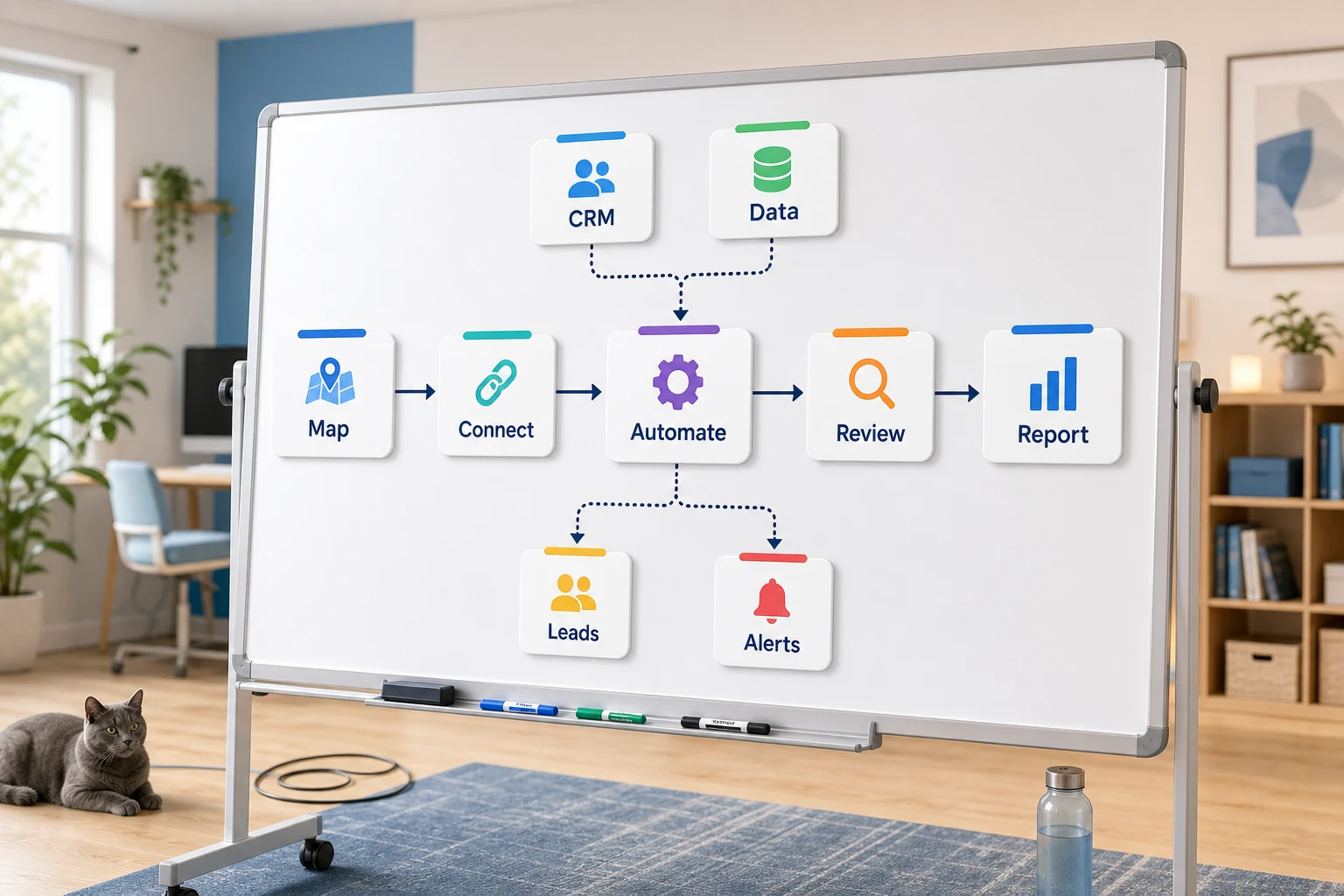
Practical Considerations and Design Options for Business AI Agents
Practical considerations and design options for business AI agents include a range of considerations for larger organizations. For smaller organizations, the consideration is more singular: which recurring workflow can be automated to make it easier to monitor and less dependent on a person remembering multiple steps.
This guide provides a framework for assessing the real world concepts of AI email assistants. This framework allows users to more deeply understand the types of problems this technology can address, where automation can be inadequate, and how to navigate the different tiers of automation design and construct tailored AI workflows up to a complete outsourced design and management service.
Practical Automation in the Workplace
The most ideal scenarios for automation are repeating the same, unexciting, and easily verifiable tasks. These typically include email and spreadsheet exchanges, documenting notes in a CRM, managing invoices and support requests, filling out website forms, and performing routine research and reporting tasks.
Forwards handled form submissions with a clear next action and CRM owner.
Converting weekly tasks involving spreadsheets into automated dashboards and email reports.
Categorizing support requests with the exception edges to be handled by a human.
Consolidating public and private research and reports into a documents with a neat and structured outline.
Automating the integration of OpenAI, Claude, Gemini, OpenRouter, n8n, Google Workspace, Slack, Telegram or a VPS hosted workflow where it makes business sense.
Frequently looked up terms relating to this topic
These are the terms that best relate to the topic and are the most frequently looked up.
ai powered email assistant
AI RAG
chatgpt telegram bot
email ai assistant
examples of ai agents
friday ai email assistant
Tool-first vs workflow-first
Tool-first begins with a platform and aims to fit the workflow into a scenario. For a workflow-first, the handoff is the priority, who provides the input, what is considered trusted data, what is the cause for human review, and what is the ideal output to validate that the work has been done.
In Cyberlife projects this includes the current procedures, pinpointing which of those segments can be automated while ensuring the build is small enough to verify the safety of expansion.
This is to ensure the automation is more of a burden and increases the cleanup work instead of saving it.
What to prepare before implementation
Form, email, spreadsheet, file, CRM, and chat message samples.
The ideal output could be a report, a task, a CRM update, a notification, a document, or a dashboard.
Rules for exceptions and human review.
You will need the appropriate tools for easy integration.
A quick success check could be saving time and/or having fewer missed follow-ups or issues with reporting speed.
When a Custom Setup Makes Sense
Off the shelf tools will work when a process is simple enough for a team to maintain it. A custom setup is a better choice when a workflow is complex enough to cross several systems, requires an AI to interpret, needs to retain private data, or needs to run reliably on a server with monitoring and backups.
If this works for an operational workflow you would like to improve, please look at the AI Agent development services (/ai-agent-development-services/) section for the implementation aspect.
The Problem This Page is About
Most teams don't want a new platform. Most teams want a particular part of the week to stop being so fragile. Someone copies lead details from an email to a CRM. Someone exports the same numbers every Friday. Someone checks if a document was saved to the right folder. These tasks are so miniscule, they will be ignored until they show how fast a business can respond.
This is the practical context for AI RAG. The right question is not, "Does automation sound modern?" The right question is, "Where does this process break? Who needs to clean up this process? How will this process look if repetitive tasks are done the same way every time?"
For small businesses, this first version should typically be focused. Select one workflow. State the trigger. Figure out the trustworthy data. Choose the review checkpoints for the person. Construct the first version without using additional systems.
Where the work typically starts
The initial attempt should be a workflow map using simple terms. There is no need to create a perfect diagram. It should answer the following uncomfortable questions: What is the source of the trigger? What data is provided? What is the tool of record? Who is in the notification recipient list? What is the definition of done? What is the expected outcome of a process failure?
This is where many of the automation projects either become beneficial, or they become worthless to the organization. If the staff is unclear on the subprocess, the automation will also be unclear. If there isn’t staff consensus on a handoff, an automated workflow will only worsen the confusion.
For many subprocesses, doing less initially, but having more later, is the better approach. Document the manual subprocesses. Remove the subprocesses that were introduced by legacy solutions. Preserve manual steps where there is a need for professional judgment. Automate the subprocesses that are redundant, and are boring and easy to validate.
Common workflows connected to this topic
The specific implementation of these common patterns will vary by business. Website form submissions can result in the creation of a new CRM record, assignment of the form owner, the sending of an initial response, and the creation of a follow-up task. Each support request can be assigned a category, matched with the corresponding account info, prepped with a draft response to be reviewed, and assigned to the appropriate staff. A weekly status email can be drafted with a collection of data from disparate tools and delivered in advance of the Monday status meeting.
Document workflows are a popular example of these patterns. Invoices, intake forms, signed contracts, and even the data captured in spreadsheet rows can all have automation applied to them in order to extract field data, complete forms, and subsequently update records in a system, with a review flag applied for cases of ambiguity.
Research workflows also fit this framework. Instead of tasking a team member to source and compile notes from the various web sites, spreadsheets, emails, and chat messages, a workflow can perform these tasks and compile the notes into a draft for review.
What should stay human
Successful automation projects demonstrate a relatively high degree of transparency in their implementation and detail what should not be automated. For example, pricing decisions, responses to sensitive customers, and legal and medical determinations all require a human touch and are examples of automation gone weak.
A good workflow can collate and process data, recommend actions to be performed, and seek confirmation. It's a time saver while also overcoming the problem of letting a system make a call that the business cannot stand by.
A lot of Cyberlife projects use the same design: “automate the prep, keep the approval.” The system constructs context, drafts messages, updates records, and displays exceptions. However, it is up to the person to determine if the case needs to be judged.
Tool choices without tool worship
While tools are important, the workflow should dictate the tools used. Some projects call for simple connectors, while others demand n8n, Make, Zapier, Google Workspace, CRM integrations, private databases, or small custom APIs. Other projects demand the use of OpenAI, Claude, and other models used for classification, extraction, summarization, and drafting. Some projects call for VPS, Docker, backups, and workflow monitoring and logging.
Tools are usually incorrectly chosen by thinking about the platform instead of the specific business problem. Workflows that have a clear purpose are always better, even if they seem less complex, than workflows that seem impressive but have no clear purpose.
When considering AI RAG, the more useful checklist is: can the workflow be tested, is there a way to identify and see errors, is the workflow understandable to a non-technical person, and can the business be able to adapt the workflow without starting from the beginning?
What to prepare before building
Before building, be sure to gather a couple of actual examples. Instead of the ideal sample data, use the email that is full of typos, the form that is only partially filled, confused rows in spreadsheets, the invoice with a vendor name that is unfamiliar, and a support ticket that generates a lot of replies.
Next, define the expected result of the automated workflow, such as an updated CRM, a report, a response template, a review queue, a task, a dashboard, a notification, a renamed file, or a report. The more detailed the expected result, the more likely the team will be able to tell if the automation worked or not.
You should also identify some exceptions up front. Things to consider include: what should stop the workflow; what should be manually reviewed; what data should remain private; what should be documented; what should never be sent automatically.
How to measure success
The best metrics are the simplest. Was the lead responded to in a timely manner? Did the report arrive in its final state? Were the support requests still routed to the correct inbox? Did the owner know what changed the instant they opened a tool? Did it help the team shift from responding to support requests to triaging requests and making decisions?
Not all automation requires a detailed ROI. For many things, particularly at a smaller business, automation is best justified by the time and errors reduced.
The key is to at the very least measure the effort and time associated with the process that is to be automated. A good first automation should improve a task that is daily or weekly and make it clear it was automated. If nothing was noticed, the project was likely too abstract.
The practical work should stay clear: map the process, connect the tools, handle exceptions, and leave the business with a workflow that can be checked and maintained.
What the First Version Should Include
The first useful version should show what the trigger is, what the result is, and what failure looks like. If a workflow is triggered by a form being submitted, the team should know who the owner of the record is, who the recipient of the notice is, how the anomalies are resolved, and where the record will show up. If a workflow is started by a report from several data sources, the owner should know which data source was the reason for a report being generated and not receive a summarized report.
This becomes even more critical with the introduction of AI. The AI tool has the ability to summarize, classify, extract, and even draft. But the workflow that is built around this AI should be rigorously testable. The AI tool should have exemplars for input. Should be reviewed for output. Should be logged for activity. And if the AI tool is not sure, it should ask for help rather than fill in the gaps.
The first deployment should be simple with few branches. Early stage teams are often tempted to automate as many edge cases as possible on the first day. This usually results in a fragile build. Focus on the main workflow, implement a review queue, and scale the process after the organization discovers its true exceptions.
What can go wrong?
Automation fails in predictable, boring way. Like when a field name updates, a CRM owner goes missing, a spreadsheet tab is renamed, a vendor alters an invoice format, or a model provides a confident answer that opposes the account history. Checks should be built into automation, not automate everything to account for the problems.
Good automation design builds in fallback behavior. A missing field shouldn't affect a workflow. A guess shouldn't be made to fill in data. Drafts shouldn't be sent to customers for approval.
This is usually the biggest differentiator between a prototype and a fully functioning business system. A prototype can account for a simple, straightforward build. A fully functioning business system can account for the unstructured, complex world we live in.
When to ask for help
Simple automation is mostly okay when the process is straightforward, the tools synchronize, and a staff member can support the automation. Assistance is warranted when a workflow spans multiple systems, involves private data, advanced AI is required to complete tasks, or is a concern for sales, customer service, finance, and operations functions.
Cyberlife Development is capable of mapping the workflow, creating the initial version, and providing the team with an actionable process. The most effective initial step is not an extensive technical brief. It is a concise explanation of the steps in the current workflow that are inefficient along with the desired alternatives.
Where AI agents fit in a business process
AI agents for business work best when they are connected to a clear workflow, such as support triage, lead research, reporting, document handling, or internal knowledge search. If you need an agent connected to real tools and data, start with our workflow automation services.