
Best CRM and Marketing Automation
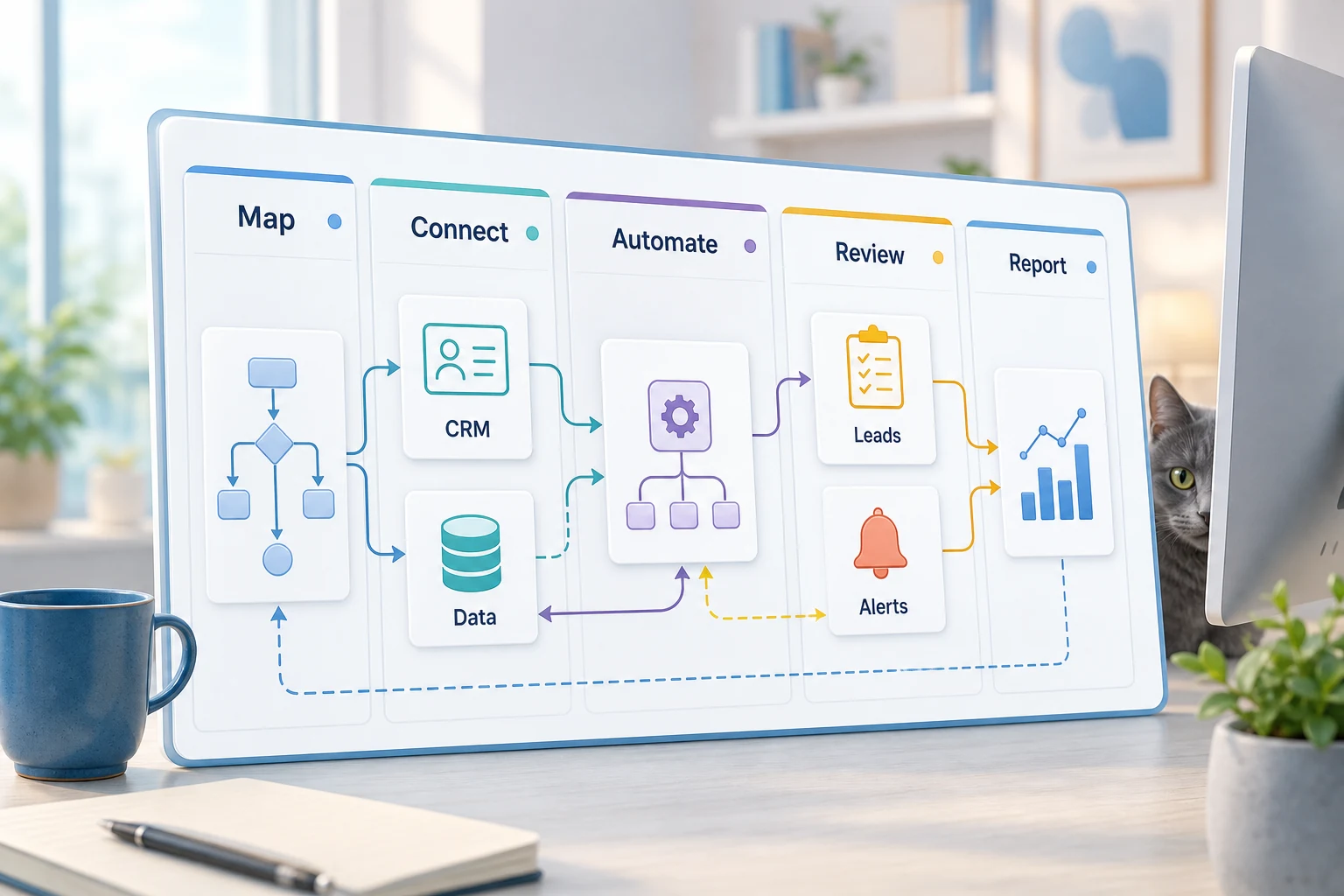
Determining the best CRM and marketing automation systems is not just a matter of multiple software solutions. For the small business, the question is, which repetitive workflows do we want to automate so that the process is simpler, quicker, and less reliant on our staff to remember the workflow?
This guide will assist you in developing a philosophy for best CRM and marketing automation. We will evaluate the types of problems you are experiencing, areas where automation breaks down, and how you can differentiate among basic tools, custom-built AI workflows, and managed solutions.
Where Does This Fit into the Real World of Business
The processes that are the best candidates for automation are repetitive, boring, and easy to fact-check. These processes are typically interfacing with email, spreadsheets, CRM updates, invoicing, customer service inboxes, web forms, research, and reporting.
designing a CRM process to assign a clear next action to each form submission
automating repetitive sheet work to create a dashboard or report sent via email to your inbox
automatically routing support tickets and handling edge cases manually
summarizing research on a topic in a clearly structured brief instead of a rubric
building business logic workflows using OpenAI, Claude, Gemini, OpenRouter, n8n, Google Workspace, Slack, Telegram, and VPS
Key terminologies
People have a way of describing the same thing using different words. These are terms to know:
automated CRM and marketing systems Tool versus workflow
A tool-centric structure refers to a system designed around a specific tool. In a workflow-centrisc structure, the first step is to identify the boundary. Who sends the input? Which data is deemed trustworthy? Is there a step requiring human intervention, and if so, what output is needed to validate the work?
The Cyberlife projects follow a more or less standardized method of process improvement design. From the documented process, identify activities that can be automated. Construct a working process of the desired automation and then scale the solution. An automation that is quick to deploy yet creates large cleanup overhead is a common mistake.
Things to have ready for design
typical examples of input: forms or receipts, emails, spreadsheet files, files, chat messages, or case notes to a CRM.
desired output: reports, tasks, CRM updates, notifications, documents, or dashboards.
guidelines for exceptions and human review.
the tools to be connected.
A quick check on success may include time saved, fewer missed follow-ups, or quicker reporting.
When Custom Setups are Justified
When the process is straightforward and the team is capable of maintaining it, ready-made solutions are sufficient. However, a custom setup is warranted when workflows integrate multiple systems, or when you need AI for further understanding, need to keep sensitive data private, or need to reliably operate on a server with monitoring and backups.
If you think this subject relates to an operational workflow you are looking to enhance, you can review our marketing and social media automation (/marketing-social-media-automation/) page for details on the implementation side.
The Real Subject of This Page
Most teams don't wake up to want a new platform. What they want is for a certain part of their week to stop being so brittle. Someone is manually putting a lead's details into a CRM. Someone is exporting the same numbers every single Friday. Someone is checking to see if a certain document is in the right folder. These are a series of tasks that are so small they can be ignored, but when combined they determine the speed with which the business can respond.
This is the context for why you need the best crm and marketing automation. The right question to be asking, isn't wondering if automation is the cool thing to do. The right question to be asking is where does the process break, who is forced to intervene to fix the break, and what would a process that handles those repetitive steps in a safe and consistent manner look like?
For the first version of an automated process, small businesses should try to keep things simple. Start with a singular specified workflow, define the trigger, establish the data points you can trust, and identify the points where someone needs to review the outcome. Then, create the simplest version that works, and you can expand on the complexity afterward.
Where the work usually begins
Simply mapping a workflow in plain language is a good place to start. You don't have to worry about drawing up the perfect diagram. You should focus on answering the tough questions, including: what is the process? What data is involved in the process? Which tool owns the data? What are the completion criteria? Who will be notified when the process is completed? What should be done if the outcome is not as expected?
More often than not, this is the point in the workflow where projects either become productive or lose focus. Where there is a lack of clarity in a workflow, there is also a lack of clarity in the automation. Where there is a lack of clarity in the automation, there is also a lack of clarity in the process. The best method is to work slowly at the start and quickly at the finish. For processes where you no longer need a tool, remove that process from the workflow completely.
Common workflows connected to this topic
Patterns may be similar, but the setup varies per business. Site forms can do several things, like create a CRM record, assign an owner, and a send an initial response and create a follow-up task. Support requests can be categorized and matched to account information to help draft and send a request to the appropriate personnel. Weekly meetings may be preceded by a report that summarizes information collected from various tools.
Document workflows are another good example. Structured but messy information is frequently stored in invoices, intake forms, PDFs, contracts, and spreadsheet rows. Automation can extract fields from these formats and rename files, update records, and provide a review flag for uncertain records.
Research workflows may be applicable as well. A workflow can consolidate and organize the raw information to create the first draft to document the notes, saving a lot of time versus the process of having someone do it manually.
What should stay human
Some projects may be very good at identifying the specific automation tasks that are safe to do. This may include pricing judgment, legal or medical decisions, sensitive customer responses, and especially documents that have a lot of unstructured data. This gives the automation a lot of strength.
A good workflow suggests the next steps, asks for the approval of the next steps, and organizes the information and asks for the justification of the steps. This very much saves a lot of time and also prevents failure of letting a system automate a task the business cannot justify.
Cyberlife has a specific design for many of its projects, called “automate the prep, keep the approval.” This automates the majority of the work for a user. It can collect context, draft messages, update logs, and illustrate exceptions to a user. The user is still needed to judge a scenario to determine if it needs intervention.
Tool Choices without Tool Worship
When it comes to workflows, the order of importance goes first, tools come second. Some projects only require simple connectors, some require the use of n8n, Make, Zapier, Google Workspace, a CRM integration, a private database, or a small custom API. Some projects require the GPT family, Claude, Gemini, or one of the other models for classifying, extracting, summarizing, and drafting. Some require a Virtual Private Server (VPS), Docker, backups, monitoring, and logs, because the workflow needs to run reliably and unattended.
The reverse is also true. The wrong tool is usually the result of a project starting with a platform demo, as opposed to a business problem to be solved. There is a tendency to overestimate a tool, and underestimate a simple workflow. More often than not, a tool that is better understood and less complex is more effective than a tool that is overly complicated.
The tasks of evaluating the best CRM and assessing marketing automation should only require checking the simple questions: Can the workflow be tested? Do errors flow into the right activities? Can a non-technical user comprehend the workflow? Can the business change regulations at a later date without the company starting from zero?
What to Prepare before Building
It is important to collect the data that exemplifies the workflow when preparing for solution implementation. These do not need to be perfect samples. Collect the messy emails, incomplete forms, confusing rows in spreadsheets, and other sources of data that have the potential to be problematic.
Then delineate the output you expect. The output can include a CRM update, a dashboard, a task, a notification, a renamed file, a drafted response, a report, or a queue for human review. The delineation of the output needs to be specific enough for the team to determine the success of the workflow.
It is also helpful to delineate the exception rules early. When should the workflow be stopped? When should the workflow be escalated to a person? What information is considered sensitive? What information should be kept? What information should not be sent automatically?
How to assess if it was successful
The best metrics are standard. Did the lead get a quicker response? Did the report arrive without any cleanup? Were there fewer support requests that were routed to the wrong inbox? Did the report owner understand what the report focus was without having to open five different tools? Did the team spend less time doing data entry and more time on decisions?
Not every automation needs a complicated minimum viable product definition. In a small business, time and error management can be the only justification for the minimum viable product definition. The most important consideration for a new automation is understanding the process of the manual workflow. A first automation to be implemented should simplify a process that is used daily or weekly. If no one can identify a difference once implemented, the project is likely too abstract.
SEO and key search terms
People can refer to this topic in a variety of ways, including best CRM and marketing automation. This phrasing can vary, but the entire sales page should be written as if it was created for a business owner, not a sales page for the sole purpose of ranking for a specific keyword.
The practical work should stay clear: map the process, connect the tools, handle exceptions, and leave the business with a workflow that can be checked and maintained.
What the first version should include
A good first version should include a clear trigger, a clear end result, and a clear way to identify failure. When a workflow is initiated with the completion of a form, the team should know where the record is going, who the owner of the record will be, what sort of notification will be sent, and how exceptions will be processed. When a report is generated from multiple data sources, the owner should know which data source failed rather than receiving a nice but wrong summary report.
This is important when working with AI. AI has the potential to summarize, classify, extract, and draft. However, there should still be a workflow that is clear and testable. Inputs should have clear and sufficient examples. Outputs should be reviewed. Workflows should have clear and sufficient steps. If the AI model is unclear, the system should ask for human intervention rather than continue functioning in uncertainty.
The first version should avoid having too many branches. In the beginning, it may be appealing to automate every case. However, this usually results in a poor workflow. It is better to work with the most common case, incorporate a human review, and then continue modifying the workflow to meet user needs.
What can go wrong
Automation is meant to minimize human error, but it can still fail in dull ways such as: the field name changes, the owner field in the CRM is empty, the vendor changes the invoice format, the model generates an answer that seems confident but is inconsistent with the account's history. These don't justify avoidance of automation. These justify continuous improvement of automation.
Good automation design accounts for these limitations. For example, the workflow should notify an administrator with context to guess the missing data if the automation were to fail. A message to a customer should be a draft rather than sent without prior approval.
The demo will always show the happy path. The goal of a good automation strategy is to ensure that the system accounts for all the messiness the week brings.
When to ask for help
If you have the right tools, an internal automation can be a good use of time. For more complex automation which combines several tools, private data, and the deployment of AI which would impact major departments within the organization, Custom help is encouraged.
Cyberlife Development is a good starting point as they can assist with the mapping of the workflow, having built an initial version of the tool, and empower the organization to make ongoing improvements. A good starting point is not a long technical brief. It should be a short outline of what is currently poor in a given workflow, and what a good replacement would look like.