
Marketing Automation Guide: Tools, Workflows, and Examples
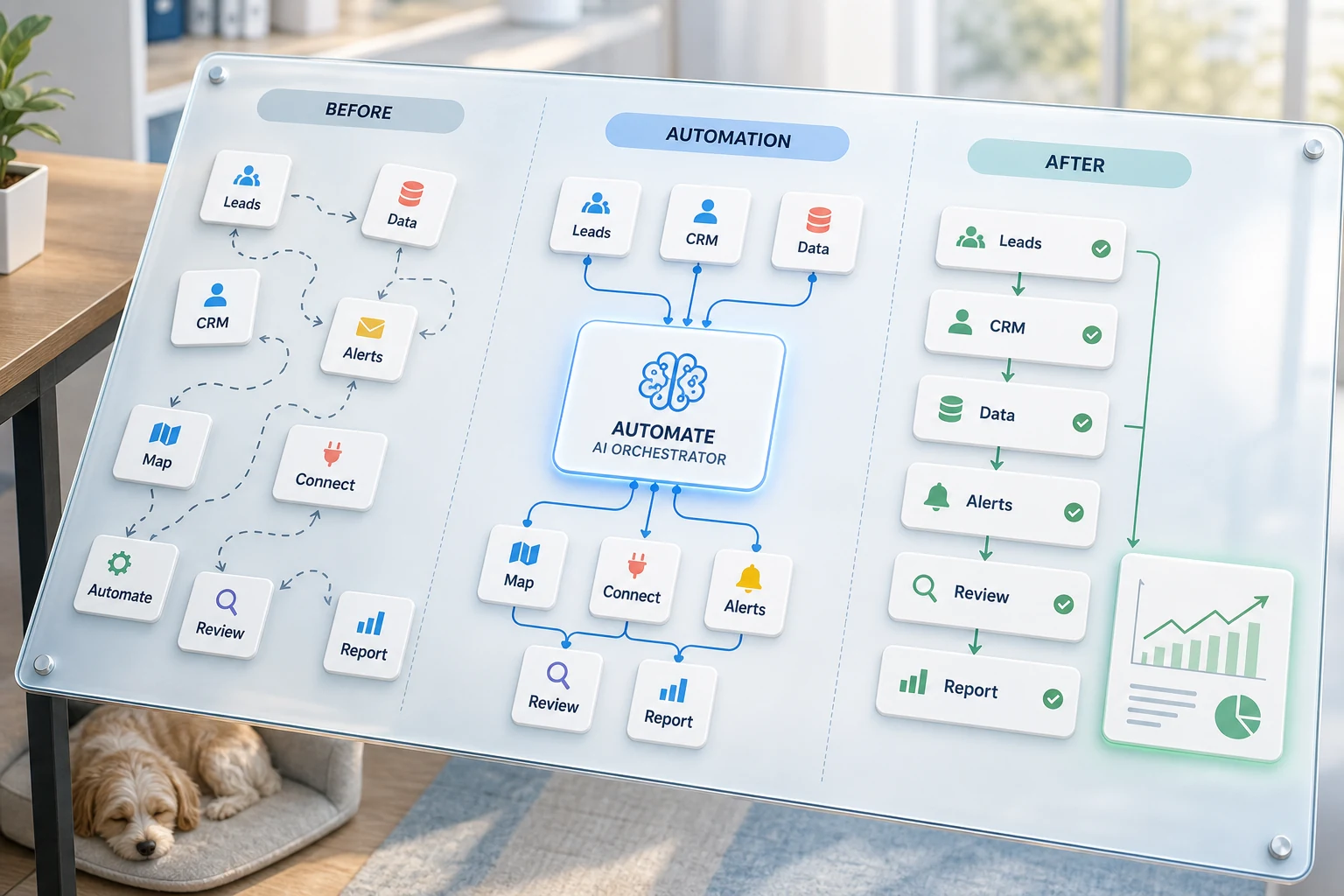
What is the marketing automation tools, workflows, and examples guide? For small businesses, it is about answering which recurring process should be automated to be faster, easier to check, and less burdensome for one person to remember.
This guide goes through how to think of AI-powered marketing automation with common sense. It shows examples of what’s solvable, typical issues with automation, and covers the options like simple tools, custom AI workflows, and managed implementation.
Where this fits in a real business
Automating boring, repetitive, and simple to confirm tasks is beneficial. Performing this task manually is tedious and burdensome for the team, yet looking at the work is mindless. Examples of tasks are those involving emails, spreadsheets, notes in your CRM, invoice management, support inboxes, website forms, research tasks and regular reporting.
segmenting form submissions into a CRM with an assigned owner and a defined next step
transforming repetitive weekly spreadsheet tasks into a reusable dashboard or emailed report
sorting incoming support requests and addressing the exception cases later
consolidating public or internal research into a tidy brief rather than a cluttered brief
establishing connections between OpenAI, Claude, Gemini, OpenRouter, n8n, Google Workspace, Slack, Telegram, or a VPS-hosted workflow where it serves the business
Related search terms
This topic has slight variations, and these are some relevant terms that might be useful:
ai-enabled marketing automation
b2b marketing automation
marketing automation platforms for b2b
marketing automation tools for b2b
marketing automation advantages
integrated crm and marketing automation systems
Tool versus workflow approach
A tool approach tries to fit a workflow into a platform, while a workflow approach is the opposite. Within the context of Cyberlife, that means mapping out the current workflow, determining which parts are safe for automation, and building the automation piece by piece.
This approach solves a major problem with other automation, where the automation created more time wasted than the original manual process.
Considerations for before starting implementation
Forms, emails, spreadsheets, CRM records, chat messages, etc. are all examples of where the input has been.
Outputs could take the form of reports, tasks, CRM updates, notifications, documents, or dashboards.
Rules to accommodate exceptions with human review.
Tools integration to facilitate access.
A brief success check: time saved, follow-ups not missed, reporting efficiency.
When Custom Setups are Justified
When the process is not complex and is easily managed by the team, off-the-shelf tools are typically sufficient. However, a custom setup is more justified when the workflow spans across several systems, demands AI for interpretation, handles sensitive data, and needs to run on a stable server with monitoring and backups.
If this topic is relevant to a workflow you aim to optimize, check our marketing and social media automation (/marketing-social-media-automation/) page for the implementation details.
Focus of this Page
Most teams do not actively seek a new platform. What they desire is to stabilize a specific portion of the week. There is someone on the team who copies lead details from an email to the CRM, exports the same numbers every Friday, and checks to see if a document was saved in the proper folder. These are tasks that are time-consuming but small enough that they are easily overlooked. However, those tasks are the primary determinant of how quickly the business can respond.
That is the marketing automation focus. The question of the hour is not "How modern does this automation sound?" The question is "How does the current process fail? Who has to clean it up? What would the process look like if the repetitive tasks were automated?"
Some key principles usually apply when building the first automated version of a process for a small business. First, narrow the initial automation to a single workflow step. Second, determine the specific conditions that should trigger the workflow step. Third, identify the minimum amount of data required to justify a step of the process. Fourth, determine potential failure points, and build a simple version of the automated workflow. Fifth, build a simple version of the workflow and continue refining the automation and adding new components.
Getting started
A simple, first-draft workflow process should be easy to follow, and should be a straightforward step-by-step guide. It should not be a formal process diagram. The draft should help identify the boundary of a process. For example, the draft should explain what initiates a process, what data elements are required, what review process is required to ensure the data is valid, and what determines the process is complete. It should also explain what mechanisms are built-in and what functions are required to ensure the expected outcome is achieved.
Narrowing the initial version of a workflow step automation encourages a better design and reduces the amount of confusion. Poor design contributes to process confusion. The best approach is to begin slowly, documenting process steps as they are automated, and expanding the automation as required. For the steps of the process that provide specific and required functions, review steps should be retained. Steps that are repetitive and are not the best use of a person's time should be fully automated.
Common workflows related to this topic
Every business will take a slightly different approach, but the workflows and patterns are fairly universal. Having a website form create a CRM record, assigning form owners and sending the first response and creating a follow-up task are done through the same process. Categorization of support requests by the account information and creating response draft requests are also similarly routed by business workflows. Pulling information from different tools and sending an email summary of the information before the scheduled meeting is also a common business process.
Another commonly automated business process is document management. Structured information on invoices, intake forms, and contracts are often in an unmanageable format. The use of automation can be done by extracting fields, renaming the document and updating records with routed uncertain cases flagged for review.
Research workflows fit this process too. Having someone gather notes from a draft, unstructured documentation from multiple websites, spreadsheets, email, and chat is less effective than the workflow drafting it first and structuring it for someone to review.
What should stay human
The best approach for automation is knowing what shouldn’t be automated. Pricing decisions, answers to sensitive customer queries, legal and medical issues, and complaint review, are all decisions that are too complex and require a human touch. It is always a good practice to know automation has its place, but it must still be useful.
A part of a good workflow is only automating the preparation of information and leaving the suggestion of the next step check approval. This helps avoid a failure that is common in business, which is letting a system make a decision that the business cannot explain.
For many Cyberlife projects, the design is "automate the prep, keep the approval." The system can gather the situation, draft the message, update the record, and show the exception. The individual decides when to exercise judgment.
Tool Choices Without Tool Worship
Tools are important, but only after you create the workflow. Some projects need only simple connectors. Some require n8n, Make, Zapier, G Suite, a CRM integration, a private database, or a small custom API. Some projects require OpenAI, Claude, Gemini, or another model for classification, extraction, summarization, or drafting. Some projects need a VPS, Docker, backups, and monitoring and logging to ensure the workflow runs reliably without someone watching.
The most common wrong tool choice happens when the project starts from a platform demo instead of a business problem. Tools can look impressive and still be wrong for the workflow, and a simple and boring setup is preferred over a flashy setup that no one understands.
For marketing automation, the best checklist is: Is the workflow testable? Are errors visible? Can a nontechnical owner understand the handoff? Can the business change the rules without starting from square one?
What to prepare before building
Before you implement, collect a few real examples. Don't use those perfect sample data. Use the messy email, the half-filled form, the confusing spreadsheet row, the invoice with a strange vendor name, or the support ticket that currently creates a back-and-forth.
Then, explain what your desired output looks like. It can be many things, including a change to a CRM, an automated message, a dashboard, a specific task, a notification, a file name change, a reply draft, a report, a human review queue. It is important to be specific so the team will know if the automation worked.
It is also a good idea to explain your exception rules. What data should never start the automation? What should be assigned to a specific person? What data should be kept private? What data should never be sent? What data should be manually entered?
How to tell if it worked
The best rules here are the simplest. Was the lead contacted faster? Was the report generated in a clean format, with no manual adjustments? Were the support requests sent to the correct inbox? Did the report owner know what changed without opening five different applications? Did the team spend less time on redundant tasks and more time making decisions?
You do not need a complicated automation to justify a return on investment, especially for a small business. The biggest benefits are time savings and reducing or eliminating errors. You should always be sure to measure the burden of the old system before implementing an improvement, even if the old system is not easy to quantify.
The best first step to automation is automating a task that is done daily or weekly and would make a measurable improvement. If the improvement is not noticeable, it is most likely the automation was too abstract or general.
SEO Strategy & Relevant Search Terms
Potential search terms for this topic include marketing automation, marketing automation software, email marketing automation, HubSpot marketing automation, marketing automation platforms, and marketing automation tools. While it’s important to analyze these terms, ultimately the content should be written from the perspective of a business owner, not from a keyword planner.
So, the essential terms should be included, and the final content should explain the actual work, which involves mapping the process, connecting tools, managing exceptions, and leaving the business with a workflow that can be audited.
Requirements for the First Draft
The first draft should include a clear input, exact expected output, and a way to indicate that the expected output has not been achieved. For example, if the intake of a workflow is a form submission, the team should understand where the new record was created, who the owner is, and what was the notification. They should also know how to address the exceptions. If the workflow was generated by combining multiple data sources, the owner should receive feedback of which data source failed instead of receiving the wrong summary as a completed workflow.
This is even more critical to consider when incorporating AI. The AI has the capability to provide input, output, and give clear feedback as to what happened. However, the workflow should still be reviewable and provide logs to actually show what happened. If the given output is uncertain, the AI should specify the uncertainty instead of pretending to know what the output should be.
The initial release should limit branching. Automating every edge case from the start is often a mistake that leads to a fragile build. Automation should focus on the most common path initially and then be augmented with a human review queue. The business should continue where the human review queue directs, as this shows exception cases.
Potential Automation Risks
Automation can fail for many boring reasons. Changes to a field name or a missing CRM owner, and rename a tab in a spreadsheet, or a vendor changing the format of their invoices are all examples of this. Weak automation design can be spotted by the presence of overly subjective messages that fail to align with case history. These are not reasons to avoid automation; they are reasons to introduce more.
Good automation design also includes optional fallback behavior. The automation should notify a person when something fails. The design should be able to be completed without unfulfilled data. Automation should draft sensitive messages to the user rather than publish the message.
These examples can show the difference between a mockup and a functional system. The mockup can show the design offering the pathway, but the real system can know the design when all paths show chaos for the user.
When to Solicit Automation Help
Simple internal automation is fine when the process is clear, the tools already integrate, and a team member can maintain it. When the workflow crosses several systems, uses private data, requires the use of AI, or touches sales, customer support, finance, or operations, that is when custom automation help is the best solution.
Cyberlife Development can analyze the workflow, create the initial version, and hand over a sustainable process for the team. The ideal first step is not an elaborate technical document. The starting point is a concise description of the currently inefficient workflow and a suggestion of a better alternative.
Turning a marketing automation guide into implementation
A marketing automation guide is most useful when it becomes a working system: forms, CRM updates, segmentation, follow-ups, reporting, and human review points. For help building that system, see our AI marketing automation service.