
How to Create a Telegram Bot
Creating a Telegram Bot
As a small business, determining how to create a Telegram bot requires analyzing various ongoing workflows in your business that need to be faster, more efficient, easier to track, and automated to eliminate reliance on the memory of your employees.
This guide looks at the Telegram bot creation process and how to think about Telegram bots. It highlights the various problems Telegram bots can help you solve and identifies the gaps that automation can’t fill. It also looks at the trade-offs between using several uncomplicated tools, custom artificial intelligence workflows, and managed automation.
Real-business Implications
The best opportunities for automation often include workflows that are simple and repetitive, and that can be easily verified.
These workflows are usually found in the gaps between your email, spreadsheets, CRM notes, invoices, support inboxes, web form submissions, research tasks, and report creation.
Submissions routed to a CRM with an assigned owner and next action
Automating the conversion of a weekly spreadsheet into a reoccurring dashboard or report that is emailed
Automatically responding to most support requests with the ability to handle the edge cases through human review
Consolidating public or internal research into a well organized brief
Creating a workflow connecting OpenAI, Claude, Gemini, OpenRouter, n8n, Google Workspace, Slack, Telegram, or a VPS, in a way that is most beneficial for the business.
Common keywords for this topic
Some keywords that are likely to be searched around this topic of interest include:
How can I create a Telegram Bot? Tool-based vs. Workflow-based Priorities
In a tool-based priority, a workflow is dictated by a given tool. In a workflow-based priority, the focus is on the handoff of work, including who provides input, what data is deemed trustworthy, what tasks require manual intervention, and the output that verifies the task was completed successfully.
In Cyberlife projects, it generally means mapping out the current procedure, determining what components can be safely automated, and building an initial implementation of that to create an automation.
What is needed prior to implementation?
Examples of the current input which can include forms, emails, spreadsheets, files, records in the CRM, or chat messages.
Examples of the desired output to include reports, tasks, CRM updates, alerts, notifications, documents, or dashboards.
Descriptions of the exceptions to the desired workflow and where manual intervention is required.
The applications to which automation needs to be integrated.
A brief success metrics, like time saved, fewer missed follow-ups, or improved reporting speed.
When to consider a Custom Setup
Use available solutions when a process is simple, and your team is able to maintain it. Custom setups are better when a workflow spans multiple systems, needs an AI’s judgment, involves proprietary data, or needs to work reliably on a server with monitoring and backups.
If you are looking to improve a particular operational workflow in relation to this topic, visit our AI automation services (/ai-automation/) page to see what we can offer to implement your ideas.
The real issue this page is addressing
Most teams do not fantasize about adopting a new platform. Instead, team members typically prefer that one particular part of their work week become less fragile. For example there are times when an employee is tasked with the copying of lead details from an email and entering them into the company’s CRM. There is a lot of fragility when company employees are each tasked with independently exporting the same data to a reporting folder each week. There is also a fragility when team employees are left to their own devices to 'verify' or 'check' the appropriate placement of a document in the appropriate shared folder.
These are examples of menial and fragil tasks that, seemingly, can be ignored. However, ironically, tasks customarily deemed to be menial are the same tasks that invariably bring about the slowest response time of the business.
This is the context for how to create a telegram bot. The focus should be on the problem your automation is aiming to solve. Where in the current process is the system breaking? Who is left to deal with the problem? What would the process be if the system successfully handled the problem?
With small businesses, it is usually best to keep the first iteration constrained. Pick one workflow, establish the trigger. Decide which data to rely on. Decide at what point a person has to review the outcome. Then make the smallest viable version before layering on more.
The start of the process
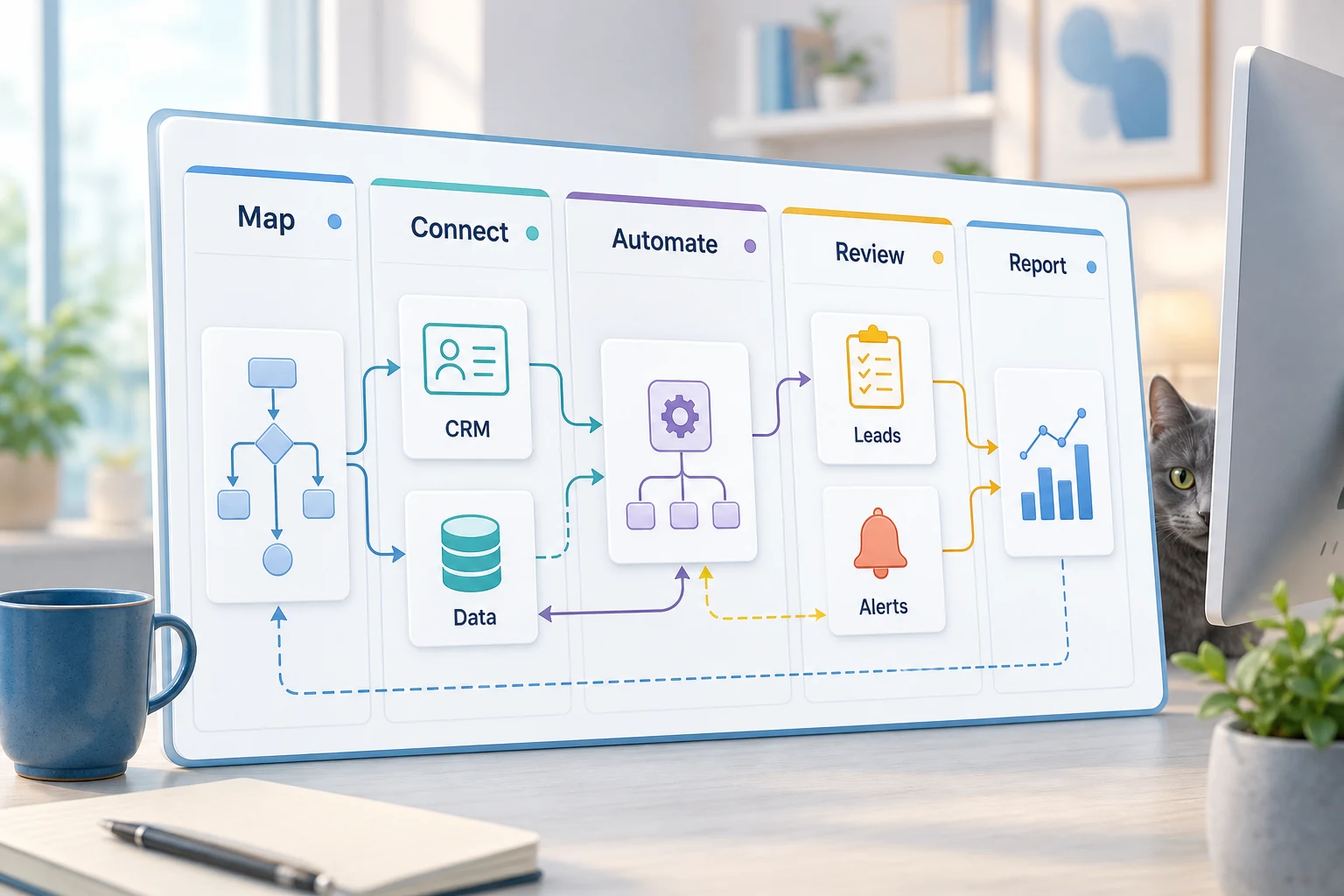
A good initial first draft is a workflow map using plain language. It does not have to be a formal diagram. It has to provide answers to some difficult questions: what starts the process, what data does the process receive, which tool owns the data, who is notified, what does the process consider completion, and what should the process do if there is something unexpected.
This is where a lot of automation projects become useful vs. noise. If there is a lot of vagueness in the workflow, then the automation will map that vagueness. If the team cannot agree on the handoff, the software will just speed up the confusion.
The best approach is to start slow and finish fast. Write down the process as it currently exists. Erase any processes that have been implemented just to accommodate a legacy tool. Keep manual steps where policy judgment/approval is required. Automate steps that are repetitive, tedious, and easily verifiable.
Common Workflows Connected to This Topic
The outline may differ from one business to another, but the principles remain the same. A web form could initiate the creation of a record in a CRM, assign an owner, send an initial email, and build a follow-up task. A request for support may be categorized and matched to an account, with a draft response prepared for review and assigned to the appropriate team member. A routine report may extract data from various applications and deliver a brief summary prior to the Monday meeting.
Document workflows may be the most common. Invoices, intake forms, PDFs, contracts, and spreadsheet rows often have structured data, but are not in a clear format. Automation may extract fields, rename files, and update data records, and uncertain instances may be flagged for review.
Research workflows may also apply. Instead of asking a team member to gather notes from disparate sources, such as websites, spreadsheets, emails, and messaging app threads, a workflow may collect the data, format it, and draft a document for the team member to review.
What Should Stay Human
The most successful automation projects candidly acknowledge what is best left to a human. Pricing, the more complex and nuanced of a customer response, legal and medical judgments and decisions, and complaints that are not the more routine, as well as documents that are less clear, will almost always require a human review. This does not make automation less effective. It makes it the most effective.
A well-designed workflow may capture and format a document, prescribe the next step, and request a human to intervene to complete the process. This improves efficiency, as well as takes control of one of the more common and detrimental mistakes of an automated process, which is allowing the automated process to make a decision, which is not explainable.
For many Cyberlife projects, the right design is "automate the prep, keep the approval." The person still reserves the right to decide when the context deserves a judgment call. The system is designed to collect relevant information, construct a draft, make updates to the record, provide an exception to the rule, and finally, show the user what is presented.
Tool choices without tool worship
Tools can enhance a system. They must complement a thoughtfully devised system. Many projects can be simplified by the use of various connectors. An adequate integration can be accomplished using n8n, Make, Zapier, Google Workspace, a CRM tool, a dedicated database, and a custom API. Some projects may use OpenAI, Claude, or newer generative tools and models for classification, extraction, summarization, or drafting. Others may require a Virtual Private Server, Docker, and an array of enhancements and tools to provide real-time system monitoring and logging.
A wrong tool is often the result of the project commencing with a tech demo instead of addressing a business problem. An impressive tool may be counterproductive to a business process. An uncomplicated design that is understood by the team is preferred over a complex system design that is intimidating.
When thinking of a way to develop a telegram bot, the simplest means of evaluation are: Is the workflow testable? Are errors visible? Is the handoff understandable to a non-industry user? Can the rules of the business change without a complete redesign of the bot?
What to prepare before building
When implementing a system, try to source as many live examples as possible. Use real-world examples as much as possible. Do not try to use a perfect business model. Use the unstructured email, the half-complete entry form, the draft spreadsheet, the invoice that is presented to an unidentified supplier, or the support ticket that is submitted to the help desk to try to explain the ongoing workflow.
Next, indicate what the expected outcome should be. The framework should specify updates to a CRM, dashboards, tasks, alerts, renamed files, prewritten responses, reports, or a queue for manually reviewing results. It should be clear to the team when the output is achieved.
It is useful to describe exception rules at this point. What should the workflow be interrupted by? What should be hand delivered? What data should remain confidential? What events should be recorded? What actions should never be taken automatically?
How to measure on the outcome
The best metrics will be the simplest. Did the contact get a quicker reply? Did the report show up clean and ready to go? Did the number of emails in the wrong support request inbox fall? Did the owner have to open five different applications to know what changed? Did the team spend their time making choices instead of copying?
Not every automation needs a detailed ROI calculation. For a small company, time and errors are often enough justification for an initial automation project. The most important first step is to measure the current labor intensive process, even if the measurement is an estimate.
The first automation project should target a task that is done on a daily or weekly basis. If most people cannot notice the first project, it can be assumed that the project was too abstract.
Because of this, important terminology should be retained, and the process should be outlined: process mapping, integrating tools, designing error handling, and providing the business with a verifiable workflow.
What the First Version Should Include
The first version should include a clear trigger and outcome, as well as a mechanism for detecting failure. If a workflow is triggered by the submission of a form, the team should be informed of the form submission along with details on the owner of the record, the notifications, and the error handling. When a report is generated by multiple data sources, the owner should receive an error alert indicating which source data as opposed to receiving a complete yet incorrect report.
The iterative workflow should be even clearer when leveraging AI, which can be used for summarization, classification, data extraction, and drafting. Examples should be provided for the inputs. Outputs should be evaluated. Logs should show the process history. If a model is uncertain, the workflow should ask users for input as opposed to producing outputs.
The first release should also minimize branches. There is a temptation to automate every edge case on the first day. This, however, spiders a fragile tool. Start with a common path. Add a manual review queue, then expand the tool as the company learns where the real exceptions may occur.
What Can Go Wrong
Single jumps in automation have a boring problem. A field name may change. A customer record may go missing. A tab on a spreadsheet may change. A vendor may change their invoice format. A mode may generate a draft to an answer, while the answer may confidently contradict related history. These things should not scare you from automation. These should scare you to build automation checks.
Good automation will be designed with fall-back behaviors. If a jump in the workflow fails, a step should notify a person with a context as to how to fix the jump. If the automation is to the customer, and it is sensitive, it should be a message for review.
This is the difference from a demo to a working system. The demo shows the best case. The real system does the leap when things go wrong on a Monday.
Seeking Help
Internally, the automation of clear processes is fine when the tools connect with little friction and someone on the team is able to maintain it. It makes sense, however, to contract custom help when the workflow jumps systems, uses private data, AI, and when this is on sensitive areas like customer support, sales, finance or operations.
Cyberlife Development is able to outline the workflow, construct the initial version, and provide the team with a sustainable process. The most productive starting point is not a lengthy technical document. It is a simplified description of the workflow that is currently inefficient, along with what the ideal workflow would look like.