
What Is Sales Automation?
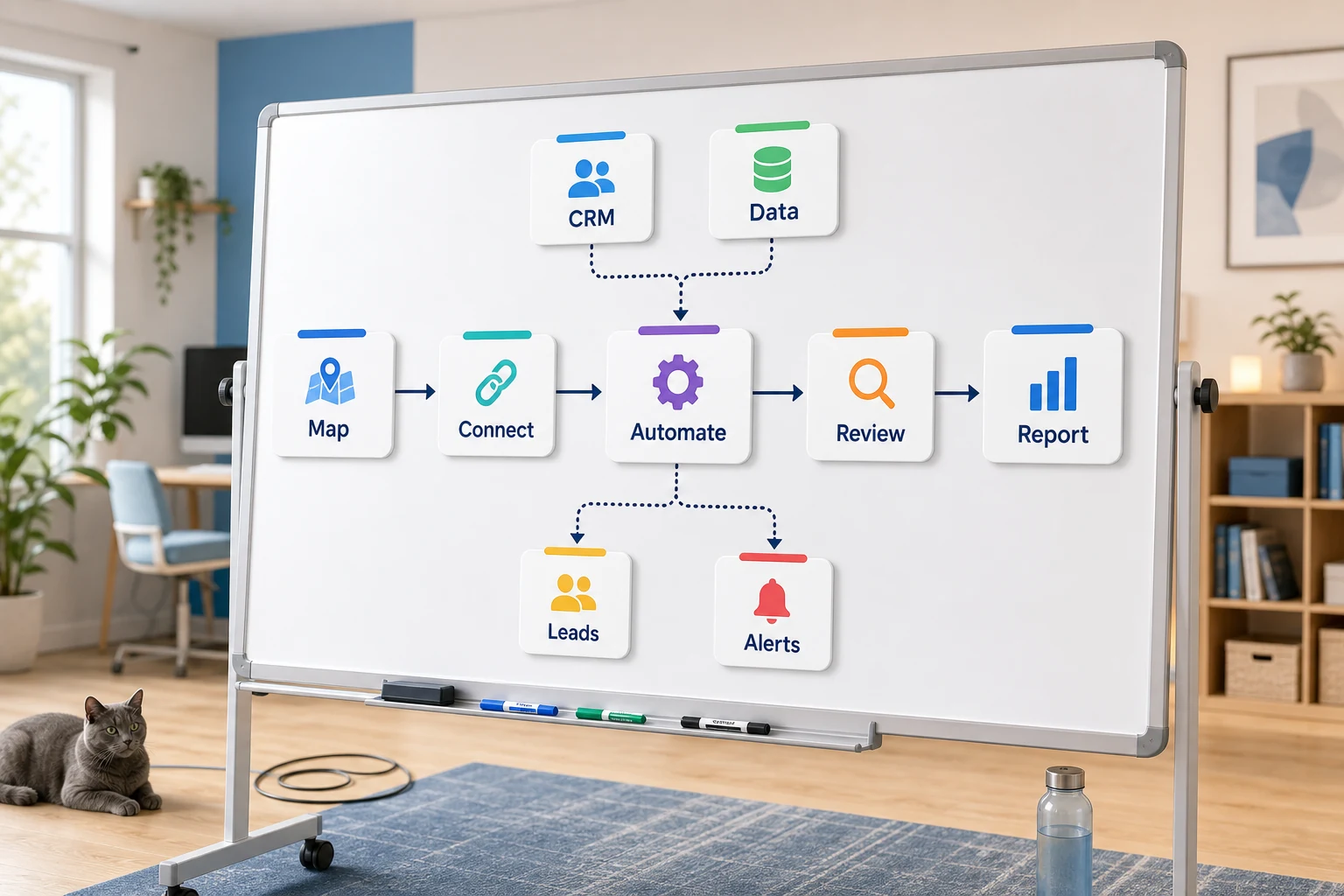
What is sales automation? goes beyond the bounds of software. What is sales automation for small businesses? It is the optimization of a recurring workflow where the steps become easier, faster, and more reliable, eliminating the need for an employee to remember the steps each time.
This guide explains how to think of sales automation. What problems does it solve? Where does automation fail? And how to choose between basic tools, custom AI workflows, and managed implementation.
Where this fits in a real business
The best opportunities for automation in a business are repetitive, monotonous tasks where errors are easily verifiable. The most mundane tasks that can be easily automated most likely involve email communications, spreadsheets, making notes in a CRM, sending invoices, answering support emails, filling out online forms, conducting research, and compiling reports.
directing form submissions into a CRM with a designated owner and next steps
transforming weekly spreadsheet activities into a repeatable dashboard or an automated email
prioritizing support requests and addressing edge cases later
converting public or internal research into a structured brief instead of an unorganized document
integrating OpenAI, Claude, Gemini, OpenRouter, n8n, Google Workspace, Slack, Telegram, or a VPS-hosted solution where it is applicable
Common Examples in This Field
One of the most pertinent examples in this area is:
what is sales automation Workflow Automation vs Tool Automation
A Tool Automation example would be a company saying “We only use this one system for everything” which poses a lot of issues for the user.
A Workflow Automation example would be documenting the process from the input to the output.
For Cyberlife projects, it often involves documenting the existing process to find the parts of the process that can be automated the safest, and then implementing small automations to expand where possible. This methodology helps solves the problem of automation that is big and flashy yet is more work to maintain than to do the task it was designed for.
What to have ready before the automation project starts
Some examples of the input, in the form of a document: emails, messages, records in the CRM system, or anything that needs to be done.
Some examples of the desired output which could be an automated task in a system, a report that is generated, or a CRM update, with docs or dashboards.
Rule set to identify edge cases and when to stop the process to have it human reviewed.
Provide the relevant access and control to all tools that are of need for linking the process.
A brief success check measuring time saves, fewer missed follow-ups, or faster reporting is required.
When choosing a custom setup is justified
If a process is simple and the team can manage it, standard tools are sufficient. A custom setup is more justified when the workflow spans multiple systems, needs AI, handles sensitive data, or needs to be continually executed on a server with monitoring and backups.
If this speaks to you, and the operational workflows you want to improve, check out our AI automation services (/ai-automation/) to see the implementation.
What the page is majorly addressing
Teams do not want a new platform. They want certain parts of their work week to stop being tedious. They want fewer people to put lead details into the CRM or some dumb process that needs to be completed every week. They want the document to be double-checked to see if it was saved in the right folder without having to do it themselves. Ignoring these processes is easy, but it eventually determines how quickly the business can operate.
It is important to ask where a process is breaking, who is having to do processes to clean up after breaking the process, and what the system would look like if the processes were automated and the steps continued to be executed in the same order every time.
For a small business, the initial iteration should typically be broader. Select a single workflow. Identify the event that initiates the workflow. Evaluate data credibility. Determine the points of review and identify areas for potential output. Then construct the smallest viable iteration prior to adding more workflows.
Where the work often begins
A useful first iteration is a workflow that is captured in layman’s terms. The diagram does not need to be engineered. It should answer some difficult questions: What is the first event in the process? What messages are passed? What tool is the system of record? Who gets the notification? How is the process deemed complete? What is expected to occur when the outcome is not as anticipated?
This is the point at which many attempts at automation projects start to deliver tangible results or are deemed of little value. When a workflow is poorly documented, the same is true for the automated workflow. If the team is not aligned on the handoff, the software will only serve to accelerate the confusion.
The better process will be slower to start and faster to finish. Document the current state and remove the steps that were only added because of the old tool. Retain the human review for high judgment decisions. Automate the repeatable, tedious, and low judgment decisions.
Common workflows connected to this topic
Each business will have their own unique setup, but commonalities can be found across many businesses. A website form can capture a lead, create a record in a CRM, assign a lead owner, send an initial email, and create a task to send a follow-up email. A support request can be classified, matched to an existing record in the system, and email the request to the support agent. A weekly report can automatically aggregate data from different systems and provide a summary the day before the Monday morning meeting.
Automating document workflows is one of the most common use cases. Invoices, PDFs, contracts, and many more document types contain information that is captured in an unstructured format. Automation can remove the need for a person to classify and rename documents, update systems, and do manual case reviews.
Research workflows are another good fit. Gathering information that is scattered across websites, email, spreadsheets and multiple chat applications can be automated. It can provide a draft for a person to use.
What should stay human
The best automation projects clearly identify areas for automation. The most common examples are price setting, responding to customer requests, and many legal and medical decisions. These examples often result in unusual requests. These all benefit from automation, but having a human answer the request makes the automation really strong.
A well designed workflow can help prepare information, recommend options, and ask a person to approve the next step. This saves a lot of time compared to doing everything manually. It helps avoid a common issue of letting the system take an action that the business won't be able to explain.
For most Cyberlife projects, the right design is “automate the prep, keep the approval.” The system can collect context. The system can compose the message and update the record and demonstrate the exception. The person decides when a situation requires their judgment.
Tool choices without tool worship
After the workflow comes the tool. The tools are important. Some projects use easy connectors. Others require n8n, Make, Zapier, Google Workspace with a CRM, a private database, or a custom-built API. There are projects requiring the same for OpenAI, Claude, and Gemini models, as well as VPS, Docker, backup, monitoring, and logging. The shrinking project of automation is done using the above tools to keep the workflow running with minimal observation.
Some of the wrong tool choices occur when starting with a platform demo over an actual business problem. Some boring setups are better and easier for a team to use than an advanced setup no one can manage.
A good checklist to consider when determining sales automation is, can the workflow be designed to allow tests, can the error be exposed, can a non-technical stakeholder understand the transfer, and can the organization adjust the mechanism.
What to prepare before building
During the design, please collect some real-life examples. They should be accurate. Poor sample data should be employed, such as an ambiguous email, a partially complete form, a confusing row in an excel spreadsheet, a strange invoice with the vendor name, or a support ticket generating constant communication.
Next explain what the output should look like. This might look like a CRM update, dashboard, task, notification, renamed file, reply, report, or human review queue. The output must be specific enough for the team to determine if the desired result was achieved.
It is helpful to create a set of exception rules from the start. What is workflow worthy? What should be routed to a human? What is considered private data? What is workflow worthy? What should never be sent automatically?
The Outcome
Most metrics fail the innovative hurdle. Did the lead get a response sooner? Did the report arrive as is? Did support requests sit in the wrong inbox? Did the owner figure out what was different by opening five tools? Did the team copy less and create more?
Not all automation is a good first step. For a small business, simple execution and obvious error avoidance are often enough. It is worth it to take a step back and look at the old workflow, however crude, before replacing it with automation.
The goal of a first automation, visible by as little as a single daily or weekly task, should be to make that task easier. If the difference can't be seen, the implementation was hollow.
topic specific SEO
Hence, the final draft must retain the significant terms while describing the core aspects of the effort, which include the following: mapping the process, linking the necessary tools, addressing the outliers, and providing the business with a checkable workflow.
What the First Draft Should Have
An effective first draft must demonstrate a clear trigger, a tangible end result, and a way to identify the system failure. If a workflow is triggered by submitting a form, the team must understand where the record ends up, who is the record’s owner, what is the notification that is sent, and what is the workflow to process the outliers. If a report is triggered by multiple data sources, the owner must receive a failed data message rather than a polished but inaccurate report.
This is more relevant when using AI. Although AI can be used to summarize, classify, extract, and draft, the workflow that is built around AI must still be testable. There should be prompts for each input, a review of the output, and a log that shows what actions were captured. Rather than covering the gaps and building a complete workflow, the system should indicate to users that there is an uncertainty.
The first draft should also aim not to have multiple pathways. On the first draft, it is very tempting to automate every edge case. This often leads to a very fragile system. A better approach is to establish the most common workflow, implement a review, and further develop the system after the business has clarified where the outliers occur.
What can go wrong
What we see in process automation is typically tedious. A CRM owner is gone. A field name is changed. A vendor alters the way they process invoices. An answer that a model has written is confident, but does not match the account history. These all warrant the construction of checks, but by no means justify the avoidance of automation. Boring automation fails can include, but are certainly not limited to: system tabs or fields being changed or renamed; a spreadsheet's tabs being revised or renamed; a missing team owner; and numerous system incompatibilities. Fallback behaviour is necessary for adequate automation design. If a step fails in a process, the workflow should notify a person who can fix it, and explain what context and scope is required. If data is incomplete, it needs to remain that way. Customer messages that require sensitivity should remain drafts and used for later approval.
The purpose of the design should be to address the requirements after the initial happy path is completed, all of the system junctions are working properly, integration and communication is in place, and you have completed the final step.
When to ask for help
When an internal automation is simple enough to not involve crossing too many paths, and required integration is already in place, then an internal design should be reviewed. If the process is complex enough to involve various disparate systems, and is cross functional and collaborative enough to affect various (and likely the most important) systems (trust, customer support, selling, finance & back office operations, etc.) then application of technology is warranted. The first step is to identify areas of workflow where the team would agree process is sub-optimal, and what would constitute an ideal process. And this can all be communicated via a short document, not a long and complicated technical build.