
What Is AI Automation?
What does AI Automation Mean?
Wondering “what is AI automation?” brings up a lot more questions for a small business owner than just asking for the definition of AI or automation. A small business might ask themselves which workflows would be more efficient if they didn’t have to rely on someone remembering steps or if the workflow didn’t rely on manual repetitive tasks and could be checked more easily.
This guide helps you think “what is AI automation?” practically for your business. It will help you understand what problems AI automation can help you with, what areas AI automation can be unreliable, and what options you have when you need to compare basic no-code automation tools, custom AI automation with a workflow design, and a fully managed implementation.
Boring But Important
The best candidates for AI automation are often the boring tasks that you find yourself repeating often. Tasks even someone else in the company could verify easily. Those tasks tend to be between your emails, spreadsheets, your customer relationship management (CRM) tool notes, invoices, your customer support inbox, your website forms, your research tasks, and other reporting tasks.
automatically assigning submissions to a CRM with a clear next action step
automating the conversion of a weekly exercise spreadsheet to a self-updating dashboard, or a dashboard that generates a report to be emailed
automatically sorting support tickets to handle the vast majority
synthesizing public/internal research to a brief instead of an untidy stack
making optimal use of AI (OpenAI, Claude, Gemini), OpenRouter, n8n, Google Workspace, Slack, Telegram, or a VPS to automate your workflow
Related search terms
What is ai automation
Tool-first vs workflow-first decisions
A tool-first approach tries to hammer your workflow into a platform. A workflow-first approach starts with the people seeding the work, the data you trust, what’s going to be reviewed, and what the outcome of the work looks like.
In Cyberlife, that looks like iterating the current workflow so you can spot steps that are safe to automate, and doing just that before scaling, which is what will save you from a neat bot that’s more trouble than it’s worth.
Implementation preparation
current examples of how work is seededs, forms, spreadsheets, emails, messages, CRM, or any other records.
an example of the desired outcome, be it an update to the CRM, a task, report, a notification, dashboard, or a document.
the rules that will be set to guide when and why a human will intervene.
the tools that must work together to achieve the automation.
Time saved and follow-up metrics are examples of success metrics to consider.
Custom Setup
In a simple process, and if the team can maintain it, off-the-shelf solutions are sufficient. A custom setup makes sense when a workflow is cross-system, requires AI, needs to deal with sensitive data, and must operate reliably on a server with monitoring and backups.
If you see this topic is relevant to an operational workflow you want to improve, check our AI automation services (/ai-automation/) page for the implementation.
What This Page Is Really About
Most teams do not want to start the day with a new platform. They want the day when something fragile stops. Someone does the same collection of all the leads and sends the details to the CRM. Someone does the same thing every Friday and sends the report with the numbers. Someone does the same thing and checks to see if the document is in the right folder. These tasks are often small and can be ignored, but in reality, these tasks determine how fast the business can provide feedback.
That is the practical context for what is called ai automation. The intelligent question is not what is the latest automation. The intelligent question is where is the process breaking, who is responsible for the messy process, and what would it look like if it was automated.
For small businesses, it's usually better to start narrower and with one workflow. Identify the trigger and data that can be trusted. Determine the need for person review. Then, program the simplest possible version before scaling to additional systems.
Start of the work
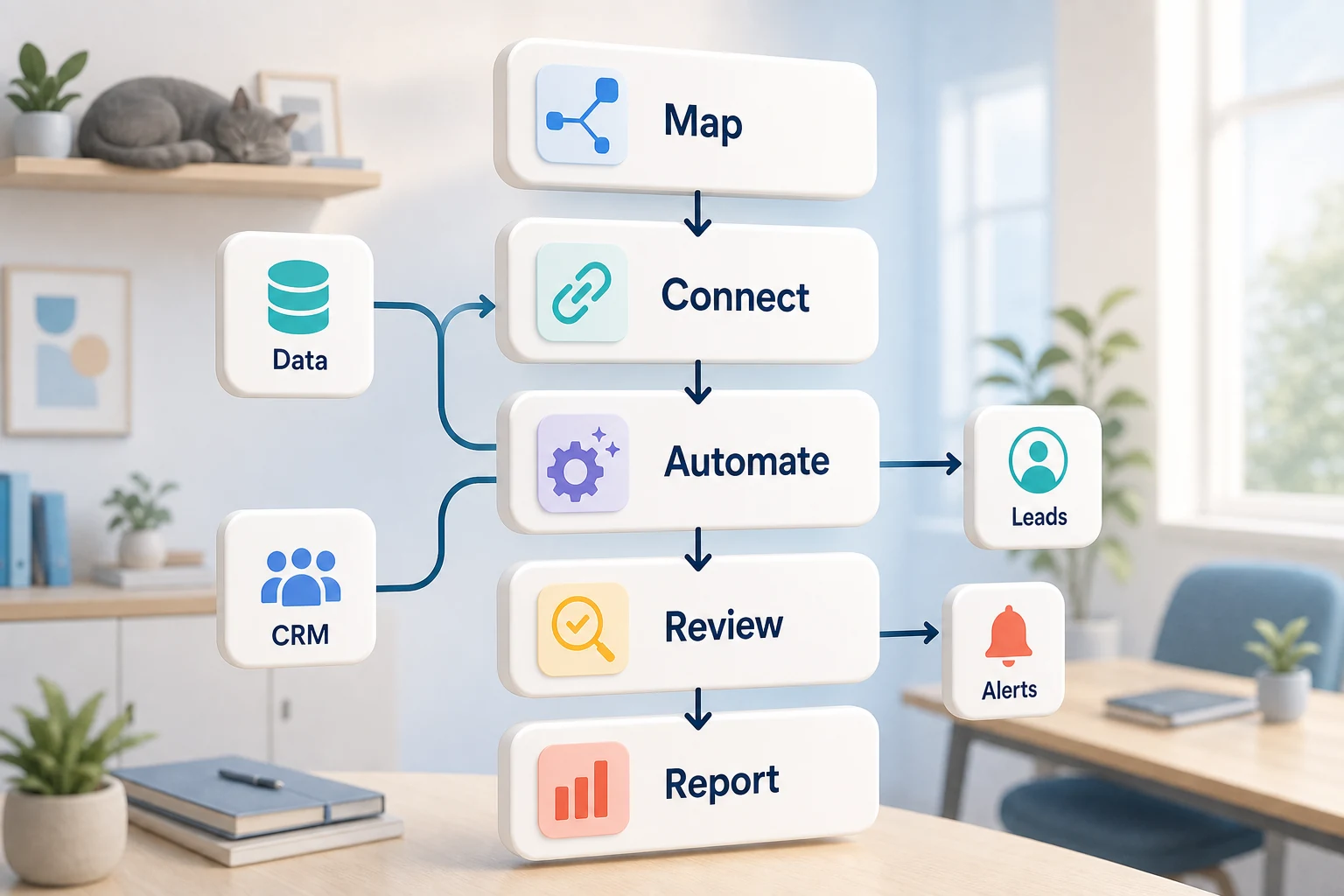
A great initial version would be a simple workflow map drawn using plain language. It should be a simple diagram that would help you answer the questions: what triggers the start, what information do they get, what tool creates the record, what notification do they get, what is considered done, and what happens when you find something that doesn’t look right.
This part of the process is what turns most automation work from helpful to busy noise. If the workflow is vague, the automation will reflect that same poor quality. If the team can't agree on the handoff, the software will just be moving confusion around.
The best order of operations is slow first and faster later. Initially write down the process as is. Then remove the steps that were a requirement of an outdated tool, and retain the steps that involve judgement. Finally, automate the steps that are repetitive and that would be easy to validate.
Common workflows connected to this topic
The specific implementation may vary from one business to another, but you will notice that there are some similarities. For example, website forms can create a record on your CRM system, assign an employee, send an automated message, and create a follow-up task. Customer support requests can be categorized and matched to the customer record, automatically drafted, and assigned to an employee. A weekly report can pull data from different tools and even automate the report summary to be sent before the Monday meeting.
Document workflows are probably the most common use case. Contracts, invoices, forms, and even the submissions in a spreadsheet all contain repeated structured data that can be filed in a better format. Automation can help pull fields from forms, rename documents, update records, and even help determine if a case is uncertain and needs an employee to review.
Research workflows follow the same logic. Instead of an employee collecting a diverse range of notes that are intermixed in different forms, an automated solution can collect the notes, and organize them, and even prepare a first draft for another employee to review and use.
What should stay human
The automated processes you want to prioritize most are the ones you are being clear about, which should be automated and where employees should still validate processes. Automation has its limits. Issues like an employee's judgment should be up to the business, and processes like legally classifying a customer complaint should still be judged by a human. Automation can be most useful when it's most trusted.
An efficient system can collect data and summarize it, and even suggest the next steps to an employee. Most importantly, the system will help employees save time while ensuring the system won't decide something the business won't be able to justify.
For a lot of Cyberlife portfolios, the correct formula is "automate the prep, keep the approval." The system can collect context, write the message, change the record, and present the exception. The final call on whether to use judgment is left to the person.
Tool selection without tool worship
We should think about tools only after designing the workflow. Some projects call for basic building blocks, while others require n8n, Make, Zapier, Google Workspace, a CRM integration, a private database, or custom API. Some may require OpenAI, Claude, Gemini or other models for classification, extraction, summarization, or drafting. Others may need a VPS, Docker, backups, monitoring, and logs to ensure the workflow operates continuously and reliably.
Typically, the incorrect use of a tool is due to a project beginning with a platform demo instead of identifying the business problem. Balance is important; a tool may be fabulous but wrong in a particular workflow, while a boring build may achieve more than a stimulated but out-of-reach workflow.
What is ai automation boils down to: is the workflow testable? are the errors visible? is the handoff understandable to a non-technical person? can the business change the rules without rebuilding the system?
What to have in place before designing
Before the build take place, a few actual use examples should be gathered. This should not be ideal sample data. Email messages should use their original form. The same should be true for worksheets, invoices, and any other documents.
Define the desired outcome, which might be a dashboard, a CRM update, a renamed file, a task, a notification, a report, a draft reply, human review queue, or a workflow. Desired output should be described clearly so that the team can evaluate the success of the process automation.
It is also useful to mention the exception rules as early as possible. What should stop the workflow? What should be routed to a person? What data is classified? What should be logged? What should never be sent automatically?
How to measure if it worked
The simplest metrics work best. Which of the following happened? Did the lead get a response in a shorter amount of time? Did the report arrive without needing to be cleaned up? Did the support requests spend less time in the incorrect inbox? Did the owner know what changed without having to open five different workflow tools? Did the team spend less time copying and more time improving decision making?
The first automation project can be simply justified by time savings and error reduction, especially for a small business. The key is to measure the old workflow to justify the new workflow, even if the measurement is not exact.
A good first automation example should make the execution of a task either daily or weekly visibly easier. If people cannot notice the difference, the project was likely too ill-defined.
SEO and search terms for this topic
Different keywords will be used to search for this topic, among which is likely to be what is ai automation. While the phrasing for the search is important, the content must be readable for a business owner and not be geared toward a keywords short list.
The final document should describe the actual work performed (the specific details of the exceptions handled), and include relevant terminology with placeholders for the mapped process and connected tools, and the workflow left for the organization.
The first version should include
The first version should have a clear cause, an obvious effect, and the ability to detect a missing or failed effect. If the cause of the workflow is the submission of a form, the team should know the destination, the owner, the notification of the record, and how exceptions will be dealt with. If a report is generated from several data sources, the owner should know the failed data source, and should not have to rely on a finalized report that is incorrect.
This becomes more critical when AI is part of the process. AI can do the summarizing, classifying, and the drafting of the workflow steps. However, the workflow must be testable. There should be examples, feedback on the output, and recorded steps. If there is uncertainty, the workflow should be designed to prompt for assistance instead of offering a false sense of certainty.
The first version should also refrain from having too many branches. On the first pass, the focus should be on the most common case with a human review process, and the path should be expanded as the business identifies and prioritizes the most common exceptions.
What can go wrong
Automation disappoints while being predictable. A field name is changed. A CRM owner has gone MIA. A spreadsheet tab is renamed. A vendor changes the format of their invoices. A model responds to a request with a confident answer, but one that contradicts account history. These all warrant automation, not the avoidance of it. The goal should instead be automation with checks.
There should be fallbacks for all checks built into automation. Workflows should notify someone to take corrective action for the missing step. Messages to customers should have data placeholders instead of appended guesses.
The difference between a working business system and a demo is that the demo shows the happy path while a working business system deals with the inevitable messiness.
When to ask for help
If the process is clear and team members can maintain it, a simple internal automation is great if the tools integrate easily. If the workflow spans multiple systems and uses private data, requires AI to interpret data, and touches sales, customer support, finance, or operations, you'll need to get custom help.
Cyberlife Development can map the workflow, build the first version, and leave the team with a process they can maintain easily. The best starting point isn't a long technical brief. It's a sentence or two about the workflow that is wasting time as well as the intended outcome.